Screen Recorder Video Recorder
Video Player & Cast to TV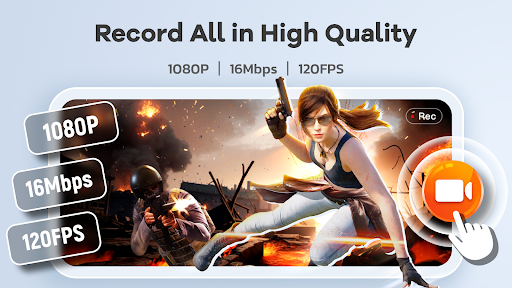




About this app
Level up your screen video with Recordify - Screen Recorder Video Recorder, the all-in-one screen recording and video making powerhouse. Capture stunning videos, engaging tutorials, winning gameplay, and memorable video calls with effortless ease. From crystal-clear recording to intuitive editing, Recordify has you covered.
🔥Transform Your Screen into a Studio:
- HD Recording: Capture every detail in breathtaking 1080P, 16Mbps, and up to 120FPS.
- Internal & External Audio: Record crisp, clear audio from your device or microphone.
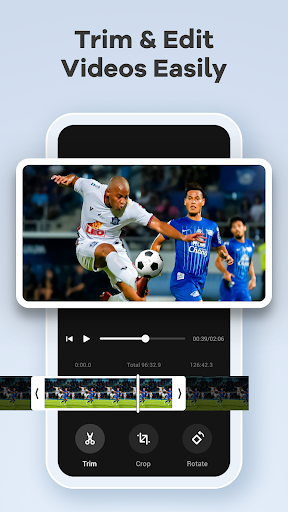
- Built-in Video Editor: Trim, crop, and rotate your videos for polished, share-worthy content.
- Video to GIF: Turn video highlights into smooth, shareable GIFs with Recordify.
- Facecam Reactions: Add a personal touch with Facecam, perfect for tutorials, reactions, and engaging with your audience.
- Live Drawing & Annotation: Explain complex concepts visually with the Brush tool, drawing directly on your screen in real-time.
- Effortless Sharing: Share your masterpieces directly to YouTube, social media, and more with just a tap.
📱Intuitive Control & Workflow with Recordify:
- One-tap Floating Ball: Start, pause, resume, and screenshot with a single touch. Control your recording without interruptions.
- Gesture Control: Customize gestures for quick actions, streamlining your video creation process.
- No Time Limit, No Watermark: Record as long as you need and share your creations without distracting watermarks.
- Customizable Settings: Adjust recording parameters and operation methods to suit your needs.
🚀More Than Just a Recorder - Your Pocket Video Maker:
- Create Engaging Tutorials: Combine screen recording, facecam, and live drawing to produce dynamic and informative tutorials.
- Capture Winning Gameplay: Record your epic victories and share your skills with the world.
- Preserve Precious Moments: Save video calls, live streams, and any on-screen activity with ease.
- Share with the World: Export and share instantly from Recordify.
Try Recordify - Screen Recorder Video Recorder and unlock your potential as a mobile video maker. Start creating and sharing your story!
➡️Contact Us:
The Recordify team values your feedback! Reach out to us at [email protected].
Important Notes:
* Please grant necessary permissions for optimal app functionality.
* Be mindful of privacy when recording.
* Respect copyrights and ensure you have authorization before recording and sharing copyrighted content. Functionality may be limited in certain copyrighted applications.
* Users are responsible for their actions during app usage. Please review our privacy policy and terms of use.
Editor's Take
Screen Recorder Video Recorder sits at 4.4 stars across 665.6 thousand ratings on Google Play, and is still building an audience.
A rating in this range tells us the core loop works for most players; the usual friction points are cosmetic or balance-tweak territory rather than anything fundamentally broken.
Video Player & Cast to TV is the publisher behind this release; we'd suggest taking a quick look at their other titles on Google Play if the style clicks with you. The last visible update lands 2026-02-09, which is a small but useful signal that the team is still shipping fixes rather than treating the app as abandoned.
Who This App Is For
A quick read on the audiences this app tends to click with, based on its category, content rating and track record on Google Play.
- Family-friendly playersContent is rated Everyone, so it's a safe pick for shared devices.
- Power usersBuilt for people who want a focused utility, not a feed.
- Free-tier explorersFree on Google Play, so you can trial the loop before deciding if it earns space on your home screen.
At a Glance
thumb_up What stands out
- Consistent high ratingsA 4.4-star average across 665.6 thousand ratings is a strong quality signal.
- Free to try on Google PlayNo upfront cost, so you can confirm the loop clicks before committing time or in-app purchases.
- Actively maintainedLast visible update 2026-02-09, suggesting the team is still shipping fixes.
- Known publisherPublished by Video Player & Cast to TV — worth checking their catalogue for similar titles.
info Things to know
- Smaller user baseNiche community means fewer community guides — great for discovery, slower for help with edge cases.
- In-app purchases may applyFree-to-play economics are common in this category — open the Google Play listing to confirm the monetization model before committing.
- Check device compatibilityOlder devices or restricted regions sometimes filter out specific Google Play listings. Confirm on the official page before setting aside time.
Key Features
- 🔥Transform Your Screen into a Studio:
- - HD Recording: Capture every detail in breathtaking 1080P, 16Mbps, and up to 120FPS.
- - Internal & External Audio: Record crisp, clear audio from your device or microphone.
- - Built-in Video Editor: Trim, crop, and rotate your videos for polished, share-worthy content.
- - Video to GIF: Turn video highlights into smooth, shareable GIFs with Recordify.
- - Facecam Reactions: Add a personal touch with Facecam, perfect for tutorials, reactions, and engaging with your audience.
- - Live Drawing & Annotation: Explain complex concepts visually with the Brush tool, drawing directly on your screen in real-time.
- - Effortless Sharing: Share your masterpieces directly to YouTube, social media, and more with just a tap.
App Information
Google Play Rating
Similar Logic Apps You May Like
grid_view Similar apps






















apps More apps you might like