About this app
The built-in compass is useful for finding directions in the dark of night. It displays the sensor status to the user and guides them on how to calibrate it according to the device's condition or location to help them keep the compass sensor in optimal condition.
The power-saving design reduces device heat generation and battery consumption, and the graphic size is minimized to ensure that the app is lightweight and runs quickly on the device.
We have eliminated excessive pop-up ads and permission requests, and designed a clean and intuitive UI so that users can access the app easily and quickly.
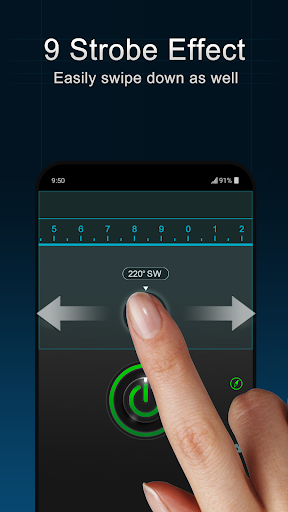
The screen light tool emits a soft light and can be more useful than a torch light depending on the location and situation. The strobe is easy and smooth to operate and is used for parties and entertainment. The Morse Code tool converts any English letter into Morse Code and displays the signal as a flashlight beam.The SOS tool is useful for emergency situations and to notify current location by expressing Morse code signals with the flashlight light. The SOS tool will work immediately if you press the SOS button while the flashlight is on or the strobe is in operation.
Features:
-Built in compass
-Compass sensor notification
-Brightest Color Screen Light
-Strobe effect with 9 frequencies
-Display Morse code in flash
-Display SOS Morse code in flash
-Intuitive UI & power-saving design
-Google Maps connection feature
Caution
The compass does not work on devices without a 'magnetic field sensor'
Compass Calibration Guide
Please keep the device away from magnetic objects or magnetic space. Then make an accurate eight-figure multiple times as in the image below.
If calibration does not work well, rotate the device several times to left, right, top and bottom. If the calibration still fails, there may be a mechanical problem with the device.
Editor's Take
Smart Flashlight sits at 4.7 stars across 126 ratings on Google Play, and is still building an audience.
That score is hard to fake on a utility app — it usually signals a tool that stays out of your way, does one thing well, and doesn't pepper you with upsells.
rootApps is the publisher behind this release; we'd suggest taking a quick look at their other titles on Google Play if the style clicks with you.
Who This App Is For
A quick read on the audiences this app tends to click with, based on its category, content rating and track record on Google Play.
- Family-friendly playersContent is rated Everyone, so it's a safe pick for shared devices.
- Power usersBuilt for people who want a focused utility, not a feed.
- Quality-first downloadersConsistently high ratings make this a low-risk trial, even at full volume on a new device.
- Free-tier explorersFree on Google Play, so you can trial the loop before deciding if it earns space on your home screen.
At a Glance
thumb_up What stands out
- Consistent high ratingsA 4.7-star average across 126 ratings is a strong quality signal.
- Free to try on Google PlayNo upfront cost, so you can confirm the loop clicks before committing time or in-app purchases.
- Known publisherPublished by rootApps — worth checking their catalogue for similar titles.
info Things to know
- Smaller user baseNiche community means fewer community guides — great for discovery, slower for help with edge cases.
- In-app purchases may applyFree-to-play economics are common in this category — open the Google Play listing to confirm the monetization model before committing.
- Check device compatibilityOlder devices or restricted regions sometimes filter out specific Google Play listings. Confirm on the official page before setting aside time.
- Update cadence unclearNo recent update date surfaced here; look at the Google Play listing to confirm active maintenance.
Key Features
- -Built in compass
- -Compass sensor notification
- -Brightest Color Screen Light
- -Strobe effect with 9 frequencies
- -Display Morse code in flash
- -Display SOS Morse code in flash
- -Intuitive UI & power-saving design
- -Google Maps connection feature