QR Code & Barcode Scanner

QR Code & Barcode Scanner

QR Easy
star4.4100.6K ratings
download10,000,000+Downloads
family_restroomEveryoneRated for
open_in_new Google Play smartphone Android
update
Updated2026-01-29
new_releases
Version3.6.0
android
RequiresAndroid 5.0+
category
CategoryTools
price_check
PriceFree
family_restroom
ContentEveryone
QR Code & Barcode Scanner screenshot 1QR Code & Barcode Scanner screenshot 2QR Code & Barcode Scanner screenshot 3QR Code & Barcode Scanner screenshot 4QR Code & Barcode Scanner screenshot 5QR Code & Barcode Scanner screenshot 6QR Code & Barcode Scanner screenshot 7QR Code & Barcode Scanner screenshot 8QR Code & Barcode Scanner screenshot 9QR Code & Barcode Scanner screenshot 10

info About this app

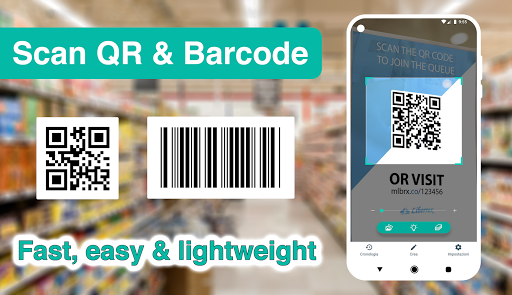
Developed by a professional engineering team, this is the most lightweight (but fast, efficient, and feature-rich) QR code scanner and barcode scanner app for Android you could ever find on Google Play Store 👍 💪

QR code reader, barcode scanner app focuses on the core functionality to scan and read the most common types of QR codes and barcodes with super fast speed and delightful user experience, designed for all Android devices.

QR code reader, barcode scanner app is extremely easy to use. It simply uses the Android phone's camera to scan and read QR code and barcode in a second then allows you to do appropriate actions effectively.

QR code scanner, barcode scanner android app helps you to scan and read all types of QR code and barcodes: Contact Info, Phone, Email, Website, Product, Text, SMS, Wifi, Map Location, Calendar Event and more…

QR code scanner, barcode scanner app can also read and help you to check the country origin and product information of a barcode to reduce the possibility of buying low quality or unknown origin products.

QR code scanner, barcode scanner app doesn’t require any special permission, it doesn’t collect any personal information or access to your device storage, contact list, or anything else. It’s simply a QR code reader app to help you scan QR codes and scan barcodes on the go, everywhere, using android phones.

QR code scanner, barcode reader app also has a QR generator feature allowing you to generate your own QR codes with different types easily.

Super-fast, super-lightweight, and easy to use

Appropriate actions on each QR code or Barcode: search on Google / Yahoo / Bing / Ecosia / DuckDuckGo, open a webpage, add a contact, send an email, call a phone number, connect to a wifi network, add an event to calendar...

History with search and filter

Advanced setting options to ensure the scanner is optimized for your own android's camera

Batch scan mode: Scan multiple QR codes and barcodes at once

Dark mode

QR code generator: generate QR code using your phone.

You can write notes on each scanned code.

HOW TO USE:

- To scan a QR code or barcode, simply open the QR scanner and barcode scanner app, point the camera in front of the QR code or barcode, and the app will automatically read the code and show you its content efficiently.

- To scan images from your device's gallery or even from content in any other apps, simply use the "Share" functionality in the Android menu: select the image in your gallery -> click the "Share" option -> select "Scan Image" with the QR scanner and barcode scanner app.

- To generate QR codes: simply open the QR code reader and barcode reader app -> select "Generate" at the bottom menu. There are many types of QR codes that you can generate based on your needs, such as contents from clipboards, website URL, text, contact information, phone number, SMS, calendar event, wifi... The QR code is created and the app allows you to save it to the device's gallery, or share the code image anywhere.

- History feature allows you to view all the QR codes and barcodes that have been scanned from the QR code reader and barcode reader app. The history is organized clearly thus helping you to find your information as efficiently as possible.

- In the settings menu, there are many options to optimize the QR code reader and barcode scanner app for your own device as well as your preferences.

ToolsEveryoneFree

rate_review Editor's Take

QR Code & Barcode Scanner sits at 4.4 stars across 100.6 thousand ratings on Google Play, and is still building an audience.

A rating in this range tells us the core loop works for most players; the usual friction points are cosmetic or balance-tweak territory rather than anything fundamentally broken.

QR Easy is the publisher behind this release; we'd suggest taking a quick look at their other titles on Google Play if the style clicks with you. The last visible update lands 2026-01-29, which is a small but useful signal that the team is still shipping fixes rather than treating the app as abandoned.

groups Who This App Is For

A quick read on the audiences this app tends to click with, based on its category, content rating and track record on Google Play.

  • family_restroom
    Family-friendly playersContent is rated Everyone, so it's a safe pick for shared devices.
  • work
    Power usersBuilt for people who want a focused utility, not a feed.
  • payments
    Free-tier explorersFree on Google Play, so you can trial the loop before deciding if it earns space on your home screen.

fact_check At a Glance

thumb_up What stands out

  • star
    Consistent high ratingsA 4.4-star average across 100.6 thousand ratings is a strong quality signal.
  • payments
    Free to try on Google PlayNo upfront cost, so you can confirm the loop clicks before committing time or in-app purchases.
  • schedule
    Actively maintainedLast visible update 2026-01-29, suggesting the team is still shipping fixes.
  • verified
    Known publisherPublished by QR Easy — worth checking their catalogue for similar titles.

info Things to know

  • explore
    Smaller user baseNiche community means fewer community guides — great for discovery, slower for help with edge cases.
  • attach_money
    In-app purchases may applyFree-to-play economics are common in this category — open the Google Play listing to confirm the monetization model before committing.
  • phone_android
    Check device compatibilityOlder devices or restricted regions sometimes filter out specific Google Play listings. Confirm on the official page before setting aside time.

auto_awesome Key Features

  • check_circle- In the settings menu, there are many options to optimize the QR code reader and barcode scanner app for your own device as well as your preferences.

assignment App Information

DeveloperQR Easy
CategoryTools
Downloads10,000,000+
Current Version3.6.0
Last Updated2026-01-29
Content RatingEveryone
PriceFree
Official StoreView on Google Play

star Google Play Rating

4.4
starstarstarstarstar
100.6K ratings on Google Play

Rating data is sourced from the Google Play Store. For the latest user reviews, visit the official app page.

psychology Similar Logic Apps You May Like

grid_view Similar apps

apps More apps you might like