About this app
Elevate your workflow with the most powerful and secure Bluetooth remote control for your devices. Turn your Android phone into a serverless keyboard, mouse, and presentation tool—no additional software needed.
Seamlessly control your computer, tablet, or media center with unparalleled versatility. Our direct Bluetooth connection ensures instant response and requires no server software, keeping your connection private and secure.
Your Professional Toolkit Includes:
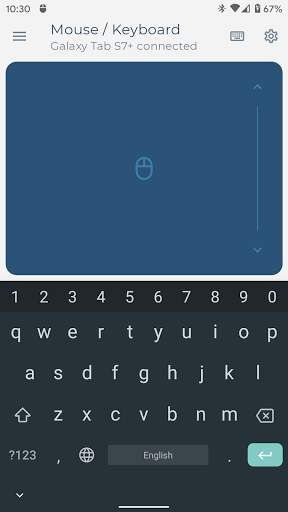
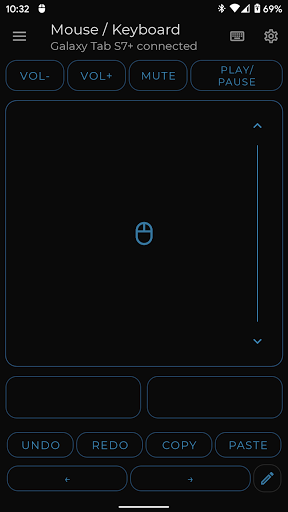
• Precision Control: A highly responsive keyboard, mouse, and multi-touch trackpad with intuitive scrolling.
• Keep-Alive / Jiggler Mode: Prevent your computer from sleeping or locking. Keep your status active on communication platforms during long tasks or when working remotely.*
• Full PC Keyboard: Type efficiently with a standard layout and switch instantly between over 100 international language layouts.*
• Presenter Mode: Command your presentations with confidence. Navigate slides, control your pointer, and engage your audience from anywhere in the room.*
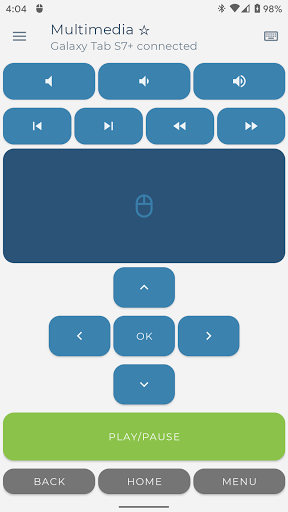
• Multimedia Control: Effortlessly manage playback, volume, and navigation for media players and streaming services.*
• Integrated Scanner: Scan QR codes and barcodes directly to your connected device, streamlining data entry and inventory tasks.*
• Voice & Clipboard Sync: Use voice-to-text for quick input or send copied text from your phone to your computer in a single tap.*
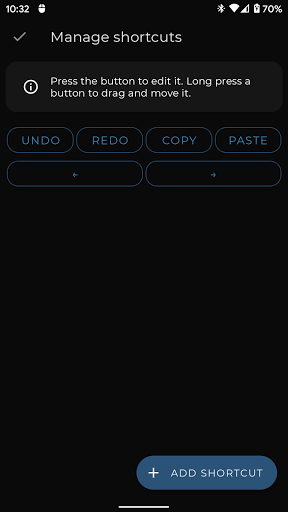
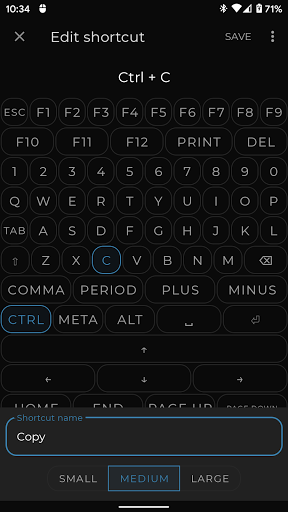
• Custom Layouts: Engineer the perfect remote interface. Build custom controls tailored to your specific software, applications, or games.
* Pro Feature
Universal Compatibility:
The receiving device requires only a standard Bluetooth connection. Tested and verified on the following operating systems:
• Windows 8.1 and higher
• Apple iOS and iPad OS
• Android and Android TV
• Chromebook Chrome OS
• Steam Deck
Support & Feedback:
Have a feature request or require assistance? Join our developer and community-led Discord channel for professional support.
https://appground.io/discord
Editor's Take
Bluetooth Keyboard & Mouse sits at 4.2 stars across 42.2 thousand ratings on Google Play, and is still building an audience.
A rating in this range tells us the core loop works for most players; the usual friction points are cosmetic or balance-tweak territory rather than anything fundamentally broken.
Appground IO is the publisher behind this release; we'd suggest taking a quick look at their other titles on Google Play if the style clicks with you. The last visible update lands 2026-02-06, which is a small but useful signal that the team is still shipping fixes rather than treating the app as abandoned.
Who This App Is For
A quick read on the audiences this app tends to click with, based on its category, content rating and track record on Google Play.
- Family-friendly playersContent is rated Everyone, so it's a safe pick for shared devices.
- Power usersBuilt for people who want a focused utility, not a feed.
- Free-tier explorersFree on Google Play, so you can trial the loop before deciding if it earns space on your home screen.
At a Glance
thumb_up What stands out
- Well-received by its audienceSitting above 4 stars on Google Play means most players finish their first session satisfied.
- Free to try on Google PlayNo upfront cost, so you can confirm the loop clicks before committing time or in-app purchases.
- Actively maintainedLast visible update 2026-02-06, suggesting the team is still shipping fixes.
- Known publisherPublished by Appground IO — worth checking their catalogue for similar titles.
info Things to know
- Smaller user baseNiche community means fewer community guides — great for discovery, slower for help with edge cases.
- In-app purchases may applyFree-to-play economics are common in this category — open the Google Play listing to confirm the monetization model before committing.
- Check device compatibilityOlder devices or restricted regions sometimes filter out specific Google Play listings. Confirm on the official page before setting aside time.
Key Features
- • Precision Control: A highly responsive keyboard, mouse, and multi-touch trackpad with intuitive scrolling.
- • Keep-Alive / Jiggler Mode: Prevent your computer from sleeping or locking. Keep your status active on communication platforms during long tasks or when working remotely.*
- • Full PC Keyboard: Type efficiently with a standard layout and switch instantly between over 100 international language layouts.*
- • Presenter Mode: Command your presentations with confidence. Navigate slides, control your pointer, and engage your audience from anywhere in the room.*
- • Multimedia Control: Effortlessly manage playback, volume, and navigation for media players and streaming services.*
- • Integrated Scanner: Scan QR codes and barcodes directly to your connected device, streamlining data entry and inventory tasks.*
- • Voice & Clipboard Sync: Use voice-to-text for quick input or send copied text from your phone to your computer in a single tap.*
- • Custom Layouts: Engineer the perfect remote interface. Build custom controls tailored to your specific software, applications, or games.