Best for
Android users who want a familiar file utility from a known publisher with clear everyday tasks.
Curated brain-training & logic apps for Android



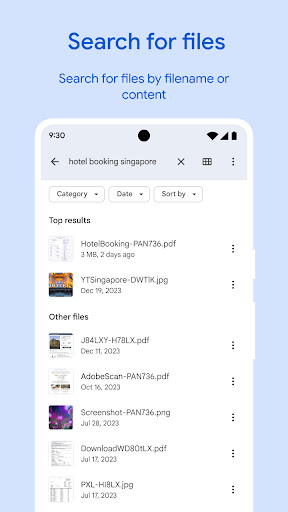
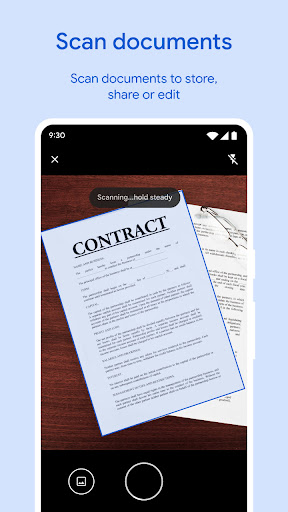
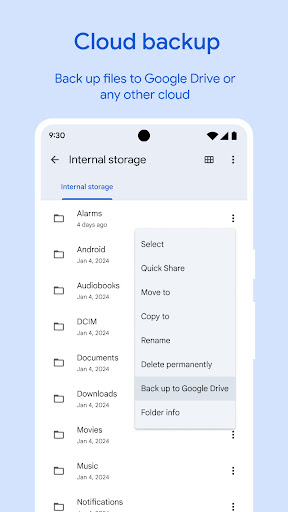
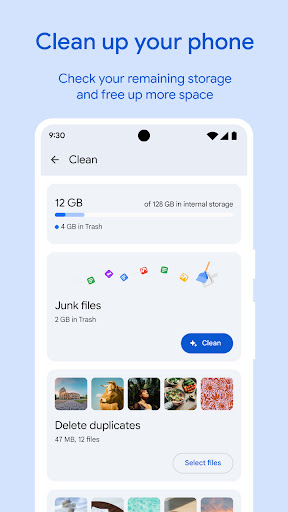
App icon and screenshots © Google LLC or the applicable rights holders. Displayed in limited form for identification and independent review. Source: official Google Play listing.
Files by Google is the safer file-management recommendation for readers who want cleanup, browsing, and sharing without chasing aggressive cleaner apps.
Android users who want a familiar file utility from a known publisher with clear everyday tasks.
Power users who need advanced network mounts, root features, or desktop-style file operations.
It anchors the Tools shelf with a practical utility that avoids the low-trust cleaner/booster category.
Review permissions and confirm that cleanup suggestions match what you are comfortable deleting.
Files by Google belongs in Tools because storage management is a real Android problem. People lose track of saved files, duplicate media, chat attachments, and items that silently consume space. A utility that makes those items easier to understand can be genuinely useful. But file apps touch personal material, so the trust bar is higher than for ordinary casual apps.
The Android utility category is full of apps that promise speed boosts, memory cleaning, or vague optimization. Files by Google is more practical: browse files, review cleanup suggestions, find documents, and share offline. That narrower promise is healthier. It tells the reader what the app actually does instead of selling a magical phone improvement.
Cleanup suggestions should be treated as suggestions, not commands. Readers should review what is being deleted, especially photos, chat media, saved files, and documents they may not recognize immediately. The best version of this app makes storage clearer. The worst use case is tapping through cleanup prompts without understanding them.
Files by Google fits readers who want mainstream storage help without becoming power users. It is weaker for people who need network mounts, root features, advanced batch operations, or desktop-style file management. LogicAppGuide should recommend it as the trustworthy everyday file helper, while making permissions, backup behavior, and deletion control part of the install decision.
The most important reader habit is pausing before cleanup. A file manager can identify large items, duplicates, or old files, but it cannot know the emotional or work value of every file. Readers should preview suggested deletions, understand backups, and avoid clearing folders they do not recognize. Files by Google earns trust when it makes that review easy. LogicAppGuide should praise clarity and restraint, not the fantasy of one-tap phone cleaning.
Files by Google is especially useful when a reader inherits a cluttered device or helps someone else clean storage. The app can show where space went without requiring advanced file knowledge. That is a real service. The reader still needs judgment, but the app can turn a vague complaint about low storage into a visible set of choices.
Files by Google exposes Google Play screenshots in the public listing data. The review uses those images to judge readability, interface density, and whether the advertised experience is clear before a reader leaves for the store.
The public record used here is last updated 2026-02-16, with version 1.10256.867145328.0-release. This context frames the review, but it does not replace the page's install cautions or comparison notes.
Files by Google is compared against nearby LogicAppGuide picks in Tools, so the recommendation answers a reader-fit question instead of repeating a store ranking.
For Tools readers, the review focuses on permission fit, account or privacy expectations, and whether the utility is worth installing alongside built-in Android options.
File utilities are high-trust apps because they touch personal storage. That is why this pick matters: the job is real, but the category is full of overpromising tools.
Files by Google is useful for readers who need simple storage visibility and file movement rather than a complicated power-user manager.
The main caution is still user control. Cleanup tools should help you understand files, not rush you into deleting things you do not recognize.
Review basis: Google Play listing metadata, screenshots, public rating signals, store feature claims, and LogicAppGuide category comparison.
Files by Google is one of the safer Tool category recommendations because it solves a real Android problem without leaning on vague cleaner-app promises. The listing describes storage cleanup, file browsing, media playback, offline sharing, cloud backup prompts, and secure file handling. That makes it a practical utility rather than a magical "boost your phone" app. The distinction matters because the Android tools category is full of overpromising cleaners and optimizers.
The strongest use case is visibility. Many users do not know what is taking space on their phone: old downloads, duplicate media, chat attachments, large videos, cached files, or forgotten documents. Files by Google can make that clutter easier to see and manage. A good file utility should help the user understand storage, not rush them into deleting things blindly.
Trust is the central review point. File managers touch personal material: photos, documents, audio, downloads, work files, and private folders. The app's developer, Google LLC, and its enormous install base are relevant signals, but they do not remove the need for user control. Cleanup suggestions should be treated as suggestions. A reader should preview what will be deleted, understand backups, and avoid clearing folders they do not recognize.
The project data shows billions of installs, millions of ratings, and recent maintenance. That makes Files by Google one of the most established apps in this review set. The rating is lower than some casual games, but for a file utility at this scale, the more important questions are stability, compatibility, permissions, and whether cleanup tools behave transparently. Readers should check recent reviews for device-specific problems, missing files, or changes to features they rely on.
Files by Google is best for mainstream Android users who want a clear way to browse files and free space. It is also useful when helping someone else clean a cluttered phone because it turns a vague complaint like "my storage is full" into visible categories. It is weaker for power users who need network mounts, root features, advanced batch operations, scripting, or desktop-style file management. This is an everyday file helper, not a professional file-control suite.
The cleanup feature should be used carefully. Duplicate or large-file suggestions can be helpful, but the app cannot know the personal value of every file. A blurry photo might be worthless or sentimental. A downloaded PDF might be old or still needed. The best user behavior is to review before deleting. LogicAppGuide should praise clarity and restraint, not the fantasy of one-tap cleaning.
Compared with Calculator Plus, Files by Google has a higher trust burden because it touches data. Compared with QR & Barcode Scanner, it has broader device access. Compared with Bitwarden, it is less security-specialized but still privacy-relevant. That makes it a good anchor for the Tools shelf: practical, recognizable, and worth using with awareness.
The app is not necessary for every user. Some phones already include capable file managers, and some users rarely manage storage manually. The recommendation is strongest for people who run out of space, lose track of downloads, move files often, or want a familiar utility from a known publisher. It is not a reason to install another app just for the sake of having one.
Offline sharing and file discovery also make the app useful beyond cleanup. A reader may need to find a downloaded PDF, move a video, share a file nearby, or identify why a phone has become difficult to manage. Those are practical workflows, not optimization theater. Files by Google is strongest when it turns a confusing storage problem into visible choices. It is weakest when users treat cleanup suggestions as automatic instructions instead of information to review.
Before installing, readers should review permissions, compare it with their built-in file manager, and understand how cleanup suggestions work. If they need simple storage visibility and file browsing, Files by Google is a strong recommendation. If they need advanced file operations, they may outgrow it. The best verdict is practical: use it when clarity and safe cleanup are the goal, but keep final deletion decisions in human hands.
It is also a good app to revisit periodically rather than obsessively. Storage cleanup does not need to become a daily ritual for most users. Checking downloads, large files, and duplicates once in a while is enough to prevent clutter from becoming mysterious. That restrained use fits the app's healthiest role: a maintenance tool that restores visibility when the phone starts feeling full or disorganized.
Files by Google should be reviewed as an everyday cleanup and browsing tool. The useful question is whether it helps a non-technical reader understand what is taking space and what can be removed safely. Storage tools need trust: labels, previews, deletion confirmation, and recovery expectations matter more than flashy cleanup claims.
Before installing or relying on it, readers should check how the app handles permissions, local sharing, and cleanup suggestions. It fits people who want a mainstream helper for downloads, duplicate files, and space review. It is less useful for power users who need network storage, hidden directories, root-level control, or complex file operations.