About this app
Unlock the Full Potential of Your Bluetooth Audio with Bluetooth Codec Changer! 🚀
Take your Bluetooth audio to the next level with the Bluetooth Codec Changer! Whether you’re gaming, calling, or enjoying songs, customize your sound experience like never before. With full codec control, you’ll enjoy crystal-clear sound, minimal delay, and unbeatable audio quality.
⚡ Auto-Switch to Preferred Codec
Seamlessly switch to your preferred codec whenever you connect your Bluetooth device—no need to adjust settings manually—everything is taken care of for you!
📋 Codec Profiles – Save Your Perfect Setup
Save and switch between your ideal codec profiles. Whether you’re gaming, calling, or listening to songs, your best sound setup is always one tap away.
📱 App-Specific Codec Configuration
Optimize your audio experience by linking codec profiles to specific apps. Customize settings for different apps and enjoy the best audio for each one.
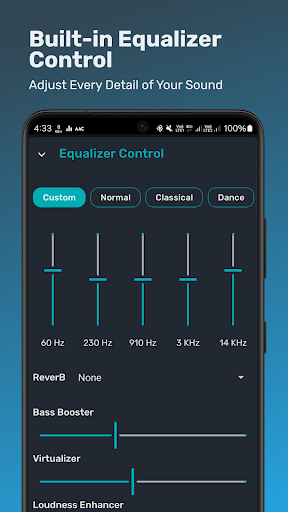
🎚️ Powerful Equalizer for Perfect Sound
Fine-tune your Bluetooth audio with EQ settings, bass boost, surround sound, and more for the ultimate experience.
🔋 Battery Status & Life Estimates
Stay informed with real-time battery status and life estimates for your Bluetooth devices. Never be caught off guard by low battery during your audio sessions.
🎶 Adaptive Sampling for Lossless Audio
Automatically adjusts audio quality based on the running audio, providing you with lossless sound and optimal clarity.
🔗 Manage Multiple Devices with Ease
Switch between Bluetooth devices effortlessly and apply different codec settings for each one. Enjoy customized sound quality, no matter which device you’re connected to.
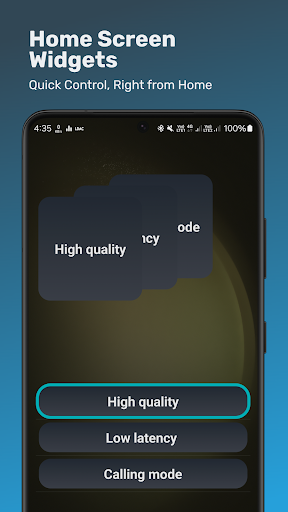
📱 Home Screen Widgets for Quick Access
Enjoy the convenience of widgets to switch between codec profiles directly from your home screen.
🔄 Full Automation
Automate your audio settings with popular automation apps for better flexibility.
⚙️ Codec Options Control
Control your audio by adjusting sample rate, bits per sample, and channel mode, along with playback quality (for supported codecs like LDAC/LHDC) for an optimized Bluetooth sound experience.
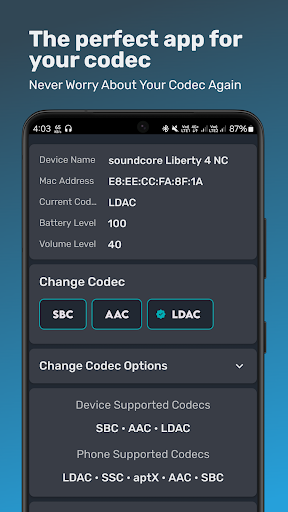
🔍 Full Codec Information
Get detailed insights on your Bluetooth device’s supported codecs and your phone’s available options. Stay informed about your current codec, battery life, and more.
🔊 Supported Codecs
Enjoy full compatibility with a wide range of A2DP Bluetooth codecs: SBC, AAC, aptX, aptX HD, aptX Adaptive, LDAC, LHDC, SSC, LC3 and more.
Editor's Take
Bluetooth Codec Changer sits at 4.5 stars across 4.8 thousand ratings on Google Play, and is still building an audience.
That score is hard to fake on a utility app — it usually signals a tool that stays out of your way, does one thing well, and doesn't pepper you with upsells.
AmrG DEV is the publisher behind this release; we'd suggest taking a quick look at their other titles on Google Play if the style clicks with you. The last visible update lands 2026-02-22, which is a small but useful signal that the team is still shipping fixes rather than treating the app as abandoned.
Who This App Is For
A quick read on the audiences this app tends to click with, based on its category, content rating and track record on Google Play.
- Family-friendly playersContent is rated Everyone, so it's a safe pick for shared devices.
- Power usersBuilt for people who want a focused utility, not a feed.
- Quality-first downloadersConsistently high ratings make this a low-risk trial, even at full volume on a new device.
- Free-tier explorersFree on Google Play, so you can trial the loop before deciding if it earns space on your home screen.
At a Glance
thumb_up What stands out
- Consistent high ratingsA 4.5-star average across 4.8 thousand ratings is a strong quality signal.
- Free to try on Google PlayNo upfront cost, so you can confirm the loop clicks before committing time or in-app purchases.
- Actively maintainedLast visible update 2026-02-22, suggesting the team is still shipping fixes.
- Known publisherPublished by AmrG DEV — worth checking their catalogue for similar titles.
info Things to know
- Smaller user baseNiche community means fewer community guides — great for discovery, slower for help with edge cases.
- In-app purchases may applyFree-to-play economics are common in this category — open the Google Play listing to confirm the monetization model before committing.
- Check device compatibilityOlder devices or restricted regions sometimes filter out specific Google Play listings. Confirm on the official page before setting aside time.
Key Features
- 📋 Codec Profiles – Save Your Perfect Setup
- 📱 App-Specific Codec Configuration
- 🎚️ Powerful Equalizer for Perfect Sound
- 🔋 Battery Status & Life Estimates
- 🎶 Adaptive Sampling for Lossless Audio
- 🔗 Manage Multiple Devices with Ease
- 📱 Home Screen Widgets for Quick Access
- 🔄 Full Automation