About this app
Ad-Free Forever! Get Free Unlimited Translation Points Upon Login!
Has supported DeepL, ChatGPT, Claude, Gemini and other advanced translation engines
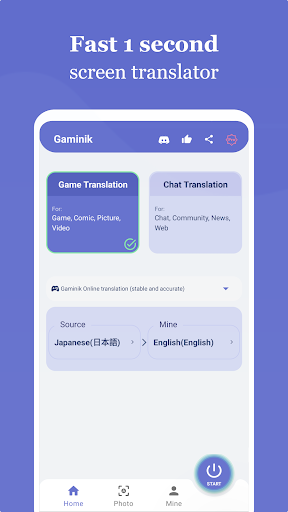
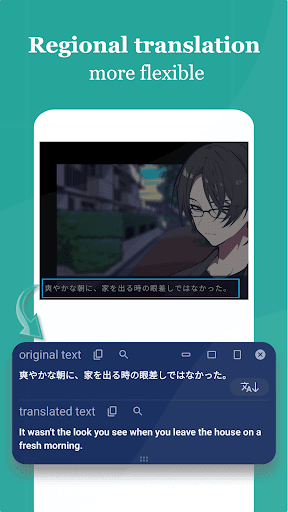
Gaminik provides the most realistic real-time translation of screen. Support translation of content such as Game, Chat, Comics, News, APP interface, Photo, etc. Support translation from 76 languages (including English, Chinese, Japanese, Korean, etc.) to 105 languages.
********
Advantage:
👍 Ad-Free experience, uninterrupted gameplay.
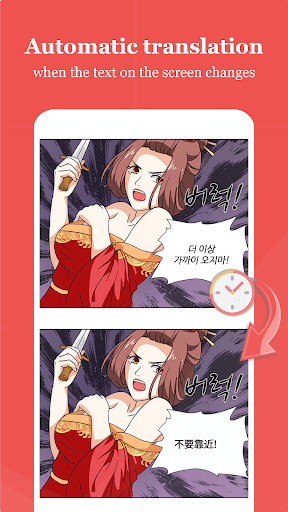
👍 Better yet, it's smarter and supports Automatic translation.
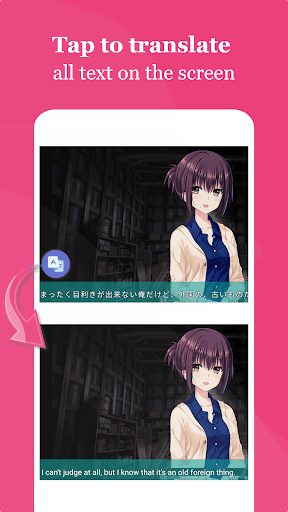
👍 More natural, the translation is integrated into the game screen, as if the game is natively supported.
👍 Faster, the translation displayed as fast as 1 second.
👍 More accurate, with the most advanced technology used for text in screen recognition and translation.
👍 Easier to use, double-tap the floating window to translate the entire screen. Translate text in input box with one tap.
👍 More versatile, supports automatic translation, partial screen translation, chat translation, photo translation, translation history, text copy, screenshot, etc.
👍 More flexible, supports adding private translation engines, cloud-based text recognition (OCR), and connection to Windows OCR.
********
More Features:
✔️ Floating Window: Double-tap for instant full-screen translation;
✔️ Area Selection: Translate selected screen areas for faster and more precise results;
✔️ Drag-to-Translate Icon: Supports dragging the icon onto text for quick translation;
✔️ Chat Translation: Real-time messaging translation + input box quick-translate;
✔️ Photo/Camera Translation: Scan physical text via camera or gallery images;
✔️ Offline Mode: Translation without internet connection;
✔️ 76 Language Support: Game text recognition (including Chinese, Japanese, Korean and other East Asian languages) → 105 Output Languages;
✔️ Default Local OCR: Screenshot text recognition without uploading to the internet, consumes minimal data traffic;;
✔️ Cloud & Windows OCR: Cloud-based + Windows-connected OCR for superior manga/comic text accuracy;
✔️ Private AI Translation Engines: Custom translators + private LLMs (Qwen-Turbo, Gemma 3, etc.)
********
This app uses AccessibilityService API: (android.permission.BIND_ACCESSIBILITY_SERVICE to access the text displayed on your screen to be able to translate it)
When you select "Chat Translation Mode" the app uses the AccessibilityService: (android.permission.BIND_ACCESSIBILITY_SERVICE is required to access text on the screen for translation). By default, it runs in "Universal Translation Mode" which does not use the AccessibilityService.
********
Translation support for the source languages:
English(English)
Spanish(español)
Portuguese(Português)
Chinese(中文)
French(français)
German(Deutsch)
Italian(italiano)
Russian(русский)
Japanese(日本語)
Korean(한국어)
Turkish(Türkçe)
Dutch(Nederlands)
Polish(polski)
Indonesian(Bahasa Indonesia)
Vietnamese(Tiếng Việt)
Hindi(हिंदी)
Swedish(svenska)
Czech(čeština)
Danish(dansk)
Romanian(română)
Hungarian(magyar)
Finnish(suomi)
Malay(Bahasa Malaysia)
Slovak(slovenčina)
Croatian(hrvatski)
Catalan(català)
Lithuanian(lietuvių)
Slovenian(slovenski)
Marathi(मराठी)
Latvian(latviešu)
...
and more 40+ languages
Editor's Take
Gaminik: Auto Screen Translate sits at 4.5 stars across 6.5 thousand ratings on Google Play, and is still building an audience.
That score is hard to fake on a utility app — it usually signals a tool that stays out of your way, does one thing well, and doesn't pepper you with upsells.
LangBag is the publisher behind this release; we'd suggest taking a quick look at their other titles on Google Play if the style clicks with you. The last visible update lands 2026-01-26, which is a small but useful signal that the team is still shipping fixes rather than treating the app as abandoned.
Who This App Is For
A quick read on the audiences this app tends to click with, based on its category, content rating and track record on Google Play.
- Family-friendly playersContent is rated Everyone, so it's a safe pick for shared devices.
- Power usersBuilt for people who want a focused utility, not a feed.
- Quality-first downloadersConsistently high ratings make this a low-risk trial, even at full volume on a new device.
- Free-tier explorersFree on Google Play, so you can trial the loop before deciding if it earns space on your home screen.
At a Glance
thumb_up What stands out
- Consistent high ratingsA 4.5-star average across 6.5 thousand ratings is a strong quality signal.
- Free to try on Google PlayNo upfront cost, so you can confirm the loop clicks before committing time or in-app purchases.
- Actively maintainedLast visible update 2026-01-26, suggesting the team is still shipping fixes.
- Known publisherPublished by LangBag — worth checking their catalogue for similar titles.
info Things to know
- Smaller user baseNiche community means fewer community guides — great for discovery, slower for help with edge cases.
- In-app purchases may applyFree-to-play economics are common in this category — open the Google Play listing to confirm the monetization model before committing.
- Check device compatibilityOlder devices or restricted regions sometimes filter out specific Google Play listings. Confirm on the official page before setting aside time.
Key Features
- 👍 Ad-Free experience, uninterrupted gameplay.
- 👍 Better yet, it's smarter and supports Automatic translation.
- 👍 More natural, the translation is integrated into the game screen, as if the game is natively supported.
- 👍 Faster, the translation displayed as fast as 1 second.
- 👍 More accurate, with the most advanced technology used for text in screen recognition and translation.
- 👍 Easier to use, double-tap the floating window to translate the entire screen. Translate text in input box with one tap.
- 👍 More versatile, supports automatic translation, partial screen translation, chat translation, photo translation, translation history, text copy, screenshot, etc.
- 👍 More flexible, supports adding private translation engines, cloud-based text recognition (OCR), and connection to Windows OCR.