Best for
Students, teams, and everyday writers who share drafts, edit across devices, or need comments and version history.
Curated brain-training & logic apps for Android


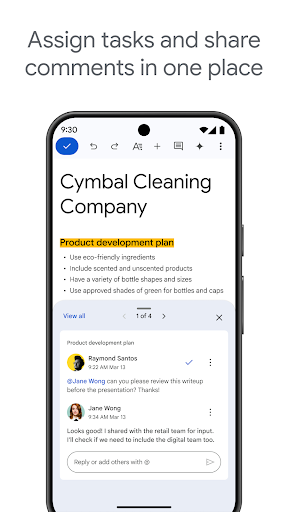


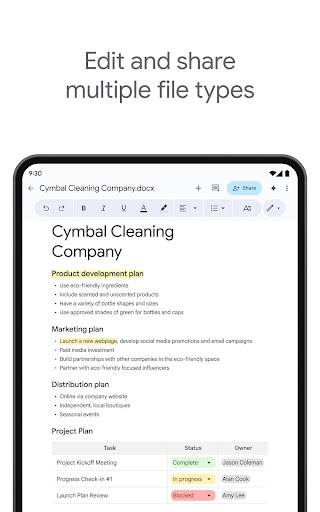


App icon and screenshots © Google LLC or the applicable rights holders. Displayed in limited form for identification and independent review. Source: official Google Play listing.
Google Docs is the practical document pick for readers who need collaborative writing and reliable access more than advanced desktop formatting.
Students, teams, and everyday writers who share drafts, edit across devices, or need comments and version history.
Users who need complex publishing layouts, offline-only storage, or advanced desktop word-processing controls.
It anchors the Productivity category with a common, workhorse writing app that many readers already touch.
Review offline settings, account requirements, and storage/privacy expectations before moving sensitive documents.
Google Docs is not exciting because it is new. It is valuable because shared writing is a common daily workflow. Comments, suggestions, version history, permissions, and cross-device access are the reasons many readers use it. On Android, the question is not whether it replaces a desktop editor. The question is whether it handles mobile reviewing and quick edits well enough.
The app is strongest for reviewing drafts, leaving comments, making small edits, checking shared documents, and keeping writing available away from a desk. It is weaker for complex layout, long formatting sessions, or work that needs a full keyboard and large screen. That honest boundary makes the recommendation more useful.
Readers should understand which Google account owns a document, who has access, whether offline files are enabled, and how sensitive material is stored or shared. Productivity apps often become homes for private work without much thought. Before relying on Docs for important files, permissions and export options deserve a quick review.
Samsung Notes is better for handwriting and quick capture on Samsung hardware. Notion is better for connected workspaces and databases. ChatGPT is better for drafting help and idea transformation. Google Docs is the dependable shared-document workhorse. LogicAppGuide should recommend it when collaboration and document continuity matter more than advanced formatting on a phone.
The easiest mistake in Google Docs is not typing; it is sharing too broadly or losing track of which account owns the file. Readers should understand viewer, commenter, and editor permissions, link access, offline copies, and organizational policies. A document app becomes a collaboration tool only when those controls are clear. LogicAppGuide should frame Docs as dependable, but not mindless. Sensitive work still needs careful account and permission habits.
Google Docs on Android is best when the reader is in motion: reviewing a shared draft, adding a comment, checking a paragraph, or fixing a small mistake. Long formatting sessions belong on a larger screen. That boundary helps readers use the app well instead of blaming it for not being a desktop workstation.
Google Docs exposes Google Play screenshots in the public listing data. The review uses those images to judge readability, interface density, and whether the advertised experience is clear before a reader leaves for the store.
The public record used here is last updated 2026-02-23, with version 1.26.075.00.90. This context frames the review, but it does not replace the page's install cautions or comparison notes.
Google Docs is compared against nearby LogicAppGuide picks in Productivity, so the recommendation answers a reader-fit question instead of repeating a store ranking.
For Productivity readers, the review focuses on permission fit, account or privacy expectations, and whether the utility is worth installing alongside built-in Android options.
Google Docs is not exciting, but it is useful because collaboration is the feature. Comments, sharing, and revision history often matter more than typography on a phone.
For readers, the question is whether mobile editing is enough for the task. Quick edits and comments work well; complex formatting is better handled elsewhere.
We include it because a productivity review set should cover dependable everyday workflows, not only novelty apps.
Review basis: Google Play listing metadata, screenshots, public rating signals, store feature claims, and LogicAppGuide category comparison.
Google Docs is a practical productivity recommendation because shared writing is a real everyday workflow. The listing describes creating, editing, and collaborating on documents from an Android phone or tablet, including comments, action items, offline work, templates, and support for multiple file types. None of that is exotic, but usefulness does not require novelty. Docs is valuable because people need to review, edit, and share text across devices.
The core feature is collaboration. A document app becomes much more useful when several people can comment, suggest changes, check version history, and access the same file without emailing copies around. On Android, the strongest use case is not laying out a perfect long document. It is reviewing a draft, leaving a comment, fixing a paragraph, checking a shared file, or capturing a change while away from a desk.
The app's massive install tier and strong rating base in the project data make sense because Google Docs is part of a larger account and workspace ecosystem. That ecosystem is also the main consideration. Readers should understand which Google account owns a document, who has access, whether link sharing is enabled, and how offline files are stored. Collaboration is powerful only when permissions are clear.
Google Docs is strongest for students, teams, writers, organizers, and everyday users who need continuity. A person can start a document on a laptop, review it on a phone, and share it with someone else without changing tools. That cross-device continuity is the main Android value. The app is weaker for complex desktop-style formatting, publishing layouts, or long writing sessions that need a full keyboard and large screen.
The project data shows no in-app purchases, which fits the utility role. However, readers should still consider storage, account policies, and privacy expectations. Documents often contain sensitive material: school work, business plans, personal writing, legal drafts, or meeting notes. The app may be familiar, but familiar tools still require careful sharing habits. The easiest mistake is not typing the wrong word; it is giving the wrong people access.
Compared with Samsung Notes, Google Docs is better for collaborative text and less natural for handwriting or PDF annotation. Compared with Notion, it is more linear and document-focused. Compared with ChatGPT, it is where edited writing can live after ideas are drafted or refined. That makes Docs the Productivity shelf's shared-document workhorse.
The mobile boundary should be clear. Google Docs on Android is useful for work in motion. It is not always pleasant for heavy formatting, large tables, complex headers, or long editing sessions. A reader who expects the phone version to replace a desktop editor may be frustrated. A reader who uses it for review, comments, and small edits will likely understand its value quickly.
Offline mode is another practical detail. The listing mentions offline work, but readers should understand how to mark files for offline access before travel or low-signal situations. Assuming every document is available offline can lead to trouble. The app is strongest when the user intentionally prepares important files.
The other overlooked detail is revision confidence. On a phone, users often make small edits in a hurry, and those edits can affect shared work immediately. Version history, comment threads, and suggestion mode reduce that risk because a team can understand what changed and why. Readers who work with classmates, clients, or coworkers should treat those collaboration controls as core features, not advanced extras. Google Docs is valuable when it makes shared text safer to revise, not only easier to open.
Before installing or relying on Google Docs, readers should review account ownership, sharing settings, offline access, export needs, and whether their workflow depends on comments or live collaboration. If collaboration and continuity matter, Google Docs is one of the safest productivity recommendations. If the main need is private handwriting, complex layout, or a database-like workspace, another app may be a better fit. Its value is dependable shared writing, not being every writing tool at once.
For mobile readers, Docs is also useful as a review inbox. Many people do not write full documents on a phone, but they do approve changes, answer comments, check a shared draft, or fix a sentence before a deadline. That smaller role is not a weakness. It is exactly how a mobile document app can earn its place in a serious workflow.
Google Docs should be judged by collaboration habits. The Android app is not always the best place to design a complex document, but it is often the place where a reader reviews a draft, answers a comment, checks sharing, or makes a small edit away from a desk. That mobile role is practical and worth separating from desktop expectations.
Before relying on Docs, readers should understand account ownership, link sharing, offline file setup, and version history. It fits students, teams, and writers who need shared text to stay available across devices. It is less ideal for private handwriting, complex page layout, or long formatting sessions that need a larger screen.