Best for
Players who want classic number logic without learning a new theme, currency system, or event loop.
Curated brain-training & logic apps for Android


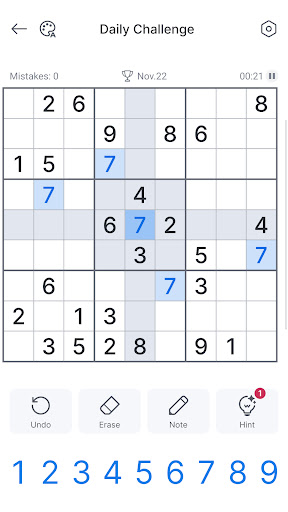

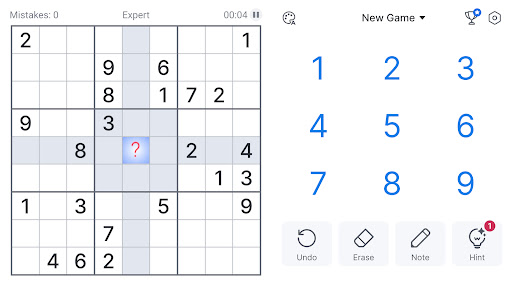


App icon and screenshots © Oakever Games or the applicable rights holders. Displayed in limited form for identification and independent review. Source: official Google Play listing.
This Sudoku pick is useful because the value is obvious: readable grids, repeatable logic practice, and a format where the app should stay out of the way.
Players who want classic number logic without learning a new theme, currency system, or event loop.
Readers who want animated rewards, social competition, or a puzzle app that changes format every few minutes.
Sudoku is the clearest baseline for logic-app quality, and this listing gives readers a familiar point of comparison inside the review set.
Look for recent comments about hint limits, mistake checking, and whether ads interrupt the grid rather than appearing between puzzles.
This Sudoku page should not be treated like a mainstream recommendation just because Sudoku itself is famous. The public listing context is more modest and shows an older visible update date, which changes how a reader should evaluate it. The value of this page is therefore not a blanket endorsement. It is a focused inspection of whether this specific Android Sudoku implementation gives the player a clean grid, sensible tools, and a distraction-free place to practice deduction.
Sudoku apps succeed or fail in tiny interface choices. Pencil marks need to be quick. Selected rows, columns, and boxes should be obvious without making the grid noisy. Mistake checking should help the reader learn, not turn every puzzle into a punishment system. Difficulty labels should mean something. Because the rules are universal, the app cannot hide behind novelty. If the interface interrupts thinking, the app is not doing its main job no matter how many puzzles it offers.
This is for readers who want actual deduction. A tile matcher lets the eye find pairs; Sudoku asks the player to hold constraints in mind and test assumptions across the grid. That can feel slower, but it is also more satisfying for people who want a thinking routine rather than a clearing routine. The best reader is someone who enjoys being quiet with a board and does not need animation, events, or competitive pressure to stay engaged.
Before installing, the reader should inspect screenshots for notes, dark mode, number contrast, and hand position comfort. Then check recent reviews for crashes, ad placement, and whether the app is still maintained on current Android devices. A Sudoku app can have a small footprint and still be worthwhile, but only if the essentials are stable. LogicAppGuide should frame this pick as a classic logic candidate with a clear verification step, not as an automatic winner.
A Sudoku recommendation should never lean only on the fame of Sudoku itself. The app's public context is less obvious than many reviewed picks, which means LogicAppGuide has to be more useful than a badge. The page should tell readers exactly what to inspect: pencil marks, mistake settings, hint limits, offline behavior, and update history. If those details look right, the app can be a quiet logic tool. If not, the reader should choose a better maintained Sudoku implementation.
Sudoku - Classic Sudoku Puzzle exposes Google Play screenshots in the public listing data. The review uses those images to judge readability, interface density, and whether the advertised experience is clear before a reader leaves for the store.
The public record used here is last updated 2026-02-27, with version 5.48.0. This context frames the review, but it does not replace the page's install cautions or comparison notes.
Sudoku - Classic Sudoku Puzzle is compared against nearby LogicAppGuide picks in Puzzle, so the recommendation answers a reader-fit question instead of repeating a store ranking.
For Puzzle readers, the review focuses on whether the app's main loop is distinct, readable on a phone, and still worth checking after ads, hints, or purchases are considered.
Sudoku pages are easy to overrate from star scores alone because almost every app promises the same core rules. The useful differences are practical: grid contrast, note-taking, mistake feedback, difficulty labels, and whether the app respects the player during a longer solve.
This pick belongs in the review set because it keeps the Puzzle category grounded in actual reasoning rather than only matching and clearing. A reader can use it to decide whether they want pure deduction or a more visual puzzle format.
Before installing, scan the store page for screenshots of notes, dark mode, and difficulty selection. Those details matter more than marketing copy when you are going to stare at the same grid for ten or twenty minutes.
Review basis: Google Play listing metadata, screenshots, public rating signals, store feature claims, and LogicAppGuide category comparison.
Sudoku - Classic Sudoku Puzzle has a much clearer job than most mobile puzzle apps: give the player a readable number grid, a steady supply of puzzles, and enough tools to practice logic without turning the experience into clutter. Because Sudoku is already a familiar format, the app cannot rely on novelty. Its value comes from execution. A Sudoku app is good when it disappears behind the thinking and poor when its interface keeps interrupting the solve.
The Oakever Games listing presents this as an offline Sudoku app for brain training and daily practice, with a very large audience signal and a recent update in the project data. Those facts make it a credible mainstream pick, but they do not remove the need for practical scrutiny. Sudoku players care about small details: pencil marks, number highlighting, mistake checking, difficulty labels, hints, undo, dark mode, and how easy it is to select cells without mis-tapping. One weak choice in those areas can make a ten-minute puzzle feel irritating.
The main strength of this app category is real deduction. Unlike Tile Club or Art Puzzle, Sudoku does not simply ask for recognition or placement. It asks the player to hold constraints in mind: what can go in this row, this column, and this box at the same time? That makes it one of the cleanest logic recommendations in the reviewed set. A casual player can use easy grids for a calm routine; a more serious player can move into harder puzzles where guessing becomes less useful and method matters more.
The best audience is someone who wants a puzzle habit rather than a reward habit. If you enjoy working through a grid quietly, Sudoku is more satisfying than many casual apps because progress is explained by the rules themselves. You solve because you noticed a hidden single, eliminated a candidate, or saw that a number had only one possible place. That feedback is intellectually cleaner than a booster, an event chest, or a level streak. It also makes Sudoku a strong fit for readers who want mental exercise without flashy wrapping.
There are limits. A Sudoku app can advertise thousands of puzzles, but puzzle count is less important than puzzle quality. Difficulty labels should be meaningful. Easy puzzles should not require hidden advanced techniques, and expert puzzles should not collapse into guesswork. The hint system should teach without simply handing out answers. If hints only fill a number, the player learns less. If they explain the next logical step, the app becomes more useful as a practice tool. Readers should look at screenshots and recent comments for exactly that kind of clue.
Monetization needs attention too. The listing includes in-app purchases, so the free experience should be checked for ad placement and hint limits. Ads are especially disruptive in Sudoku if they appear during the solving flow rather than between puzzles. Because Sudoku requires concentration, an interruption in the middle of a grid can feel more damaging than an ad between quick tile-matching levels. A fair free version should let the player think, make mistakes, and finish puzzles without feeling managed by prompts.
This app is not the right pick for everyone. Players who want animation, story, multiplayer competition, or constant visible rewards may find classic Sudoku dry. People who dislike number grids will not be converted by a polished interface. Advanced solvers may want deeper analysis tools, variant Sudoku, technique lessons, or puzzle importing that a mainstream app may not provide. But for many readers, that simplicity is the point. A clean Sudoku app can become a daily routine precisely because it does not demand a new theme every week.
Compared with the other LogicAppGuide puzzle entries, Sudoku fills the pure-reasoning role. Tile Club is recognition-based. Water Sort is visible-state planning. Art Puzzle is visual assembly. Sudoku is constraint logic. That gives it a more durable educational value than many casual puzzle games, as long as the implementation respects the grid.
Before installing, check four things. First, do the screenshots show clear notes and readable numbers? Second, are difficulty levels easy to find? Third, do recent reviews mention ads during play or only between puzzles? Fourth, does the app support offline solving in the way you actually need? If those answers are positive, Sudoku - Classic Sudoku Puzzle is one of the safer puzzle recommendations: familiar, focused, and genuinely tied to logical thinking.
For this Sudoku page, the manual review question is whether the app gets out of the player's way. Sudoku is already a complete puzzle system, so a mobile version earns trust through small interface decisions: number-pad placement, note entry, highlighted houses, error feedback, and whether ads break concentration during a solve. I would not treat a large puzzle count as enough by itself, because a poor input layout can make even easy grids feel irritating.
Readers should compare this app against one or two better-known Sudoku alternatives before committing to it. If the screenshots show clear pencil marks and the recent reviews describe stable play, it can work as a simple daily deduction tool. If reviewers mention intrusive ads, lost progress, or difficulty labels that feel random, the better decision is to skip it and choose a Sudoku app with stronger maintenance signals.