
Best for
Families and educators who need classroom updates, messages, and student progress communication in one place.
Curated brain-training & logic apps for Android


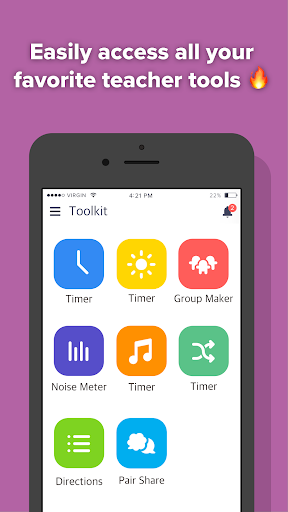
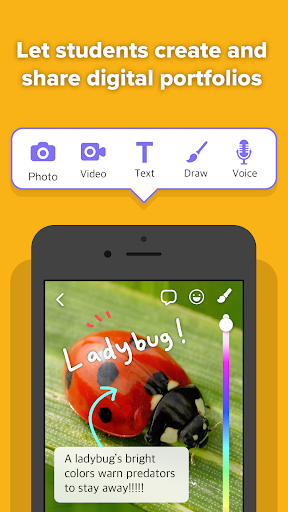
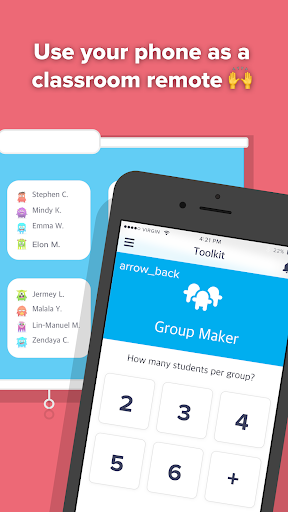


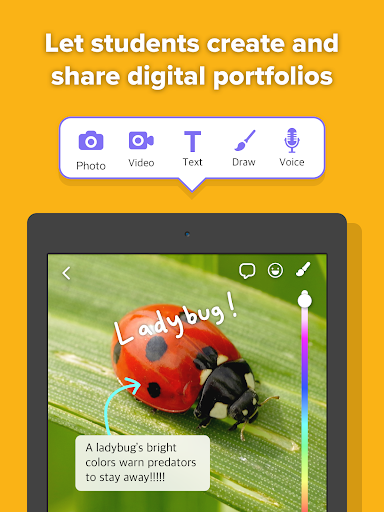
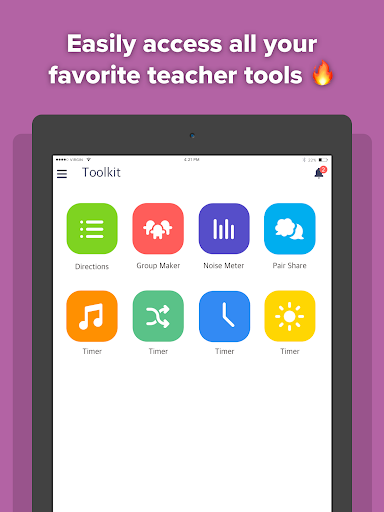

App icon and screenshots © ClassDojo or the applicable rights holders. Displayed in limited form for identification and independent review. Source: official Google Play listing.
ClassDojo is included as a school communication tool rather than a brain-training app, useful when the reader is a parent, teacher, or classroom helper.
Families and educators who need classroom updates, messages, and student progress communication in one place.
Readers looking for solo lessons, quizzes, or a study app they can use without a school context.
It adds a practical education workflow to the review set and makes the category broader than lesson apps.
Review school adoption, privacy expectations, and notification settings before relying on it.
ClassDojo is included because education apps are not only quizzes and courses. This app is about the communication layer around school: teachers sending updates, parents seeing classroom moments, students sharing work, and families staying connected to routines. It is valuable only when that network exists. A solo learner browsing for study material should not treat it as a general education app.
The best app in this category is useless if a reader's school does not use it. ClassDojo depends on teachers, parents, and students participating consistently. That makes the recommendation highly contextual. A parent whose classroom already relies on it may find it essential. A parent outside that school context may have no reason to install it at all.
School communication involves children, photos, behavior notes, messages, and family routines. Readers should review classroom policy, account roles, notification settings, and privacy expectations before relying on any platform. The public listing shows recent maintenance, but trust still comes from understanding exactly what information is shared and with whom.
LogicAppGuide should not reduce education to self-study. A tool that improves coordination between school and home can support learning even when it does not teach a subject directly. ClassDojo earns a place as a workflow pick, not a brain-training pick. The recommendation should be conditional, practical, and clear: install it when your classroom uses it and the privacy model makes sense to your family.
For parents and teachers, the app's value depends on signal quality. Useful announcements, portfolio updates, and messages can make school feel more transparent. Too many notifications can turn the same channel into noise. Readers should check settings early and understand how their class uses the platform. The app is strongest when it supports a real communication habit already agreed on by the school community, not when it becomes another inbox nobody manages.
ClassDojo exposes Google Play screenshots in the public listing data. The review uses those images to judge readability, interface density, and whether the advertised experience is clear before a reader leaves for the store.
The public record used here is last updated 2026-02-27, with version 8.26.0. This context frames the review, but it does not replace the page's install cautions or comparison notes.
ClassDojo is compared against nearby LogicAppGuide picks in Education, so the recommendation answers a reader-fit question instead of repeating a store ranking.
For Education readers, the review focuses on whether the app's main loop is distinct, readable on a phone, and still worth checking after ads, hints, or purchases are considered.
ClassDojo should be evaluated by workflow fit. If your teacher or school uses it, the app can be genuinely useful; if not, it is not a general learning destination.
That makes it different from language or coding apps. The value comes from coordination and communication, not from standalone content.
We include it because education apps are not only lessons. Sometimes the best educational utility is the one that keeps adults and students aligned.
Review basis: Google Play listing metadata, screenshots, public rating signals, store feature claims, and LogicAppGuide category comparison.
ClassDojo belongs in the Education category for a different reason than most learning apps. It is not mainly a solo lesson app, a quiz tool, or a brain-training game. The listing presents it as a communication platform for teachers, parents, and students: classroom updates, photos, announcements, messaging, encouragement, and student portfolios. That means the app's value depends on a real school or classroom using it.
The first install question is adoption. If a reader's teacher or school already uses ClassDojo, the app may become important very quickly. It can centralize updates, reduce missed announcements, make classroom moments visible to families, and help students share work. If the reader's school does not use it, the app may have almost no standalone value. That context makes ClassDojo a conditional recommendation rather than a general education download.
This distinction matters for AdSense-quality content because "education app" is too broad a label. Duolingo teaches through short lessons. Mimo teaches coding basics. Stellarium supports observation. ClassDojo supports the learning environment around the student. Communication, coordination, and family awareness can improve education even if the app does not directly teach math or reading. A good review should respect that workflow value.
The app's large rating base and recent update signal are positive because school communication tools need reliability. Parents and teachers cannot treat messages, classroom photos, or student updates as casual entertainment. Delays, notification problems, confusing permissions, or account friction can create real frustration. Readers should check recent reviews for Android notification behavior, login issues, message reliability, and whether updates have changed the experience.
Privacy deserves unusually plain language. ClassDojo may involve children's names, classroom photos, behavior notes, student work, messages, and family routines. That does not make it unsafe by default, but it raises the responsibility level. Parents should understand what their school shares, who can see it, whether photos are posted, how messages work, and what settings are available. Teachers should understand classroom policy and district expectations before relying on any platform.
The strongest audience is a parent, teacher, or guardian inside a classroom community that already uses ClassDojo. For that person, the app can reduce uncertainty. A parent may see class moments they would otherwise miss. A teacher may have a faster way to send updates. A student may build a visible portfolio. The app is weakest for a solo learner browsing for educational content. Without a classroom network, the main value proposition does not activate.
The listing includes in-app purchases, so families should also understand optional paid features before assuming the app is entirely free in practice. The most important question is whether required classroom communication remains accessible without pressure. Paid extras may be acceptable, but core school communication should feel clear and dependable.
Compared with Duolingo, ClassDojo is not a curriculum. Compared with Google Docs, it is not a general collaboration document tool. Compared with Notion, it is not a customizable workspace. It is a school-home communication channel. That focus is the reason it belongs in the reviewed set. Education is not only content consumption; sometimes the useful app is the one that keeps adults and students aligned.
Notifications can make or break the experience. Useful class announcements and messages can make school feel more transparent. Too many alerts can turn the same app into noise. Readers should check settings early, decide what needs immediate attention, and avoid treating every notification as equally important. Teachers and parents should also agree on communication norms so the app does not become another unmanaged inbox.
Student portfolios are another reason the app can matter when used well. A classroom photo or work sample can help families understand progress that would otherwise stay inside school walls. That value depends on context and consent. Teachers need clear sharing habits, and parents need to know what is being posted. When the portfolio feature is used thoughtfully, ClassDojo supports learning by making effort visible, not by replacing instruction.
Before installing, readers should confirm that their school or teacher uses ClassDojo, review privacy expectations, check notification controls, and understand optional paid features. If those conditions fit, ClassDojo can be a genuinely useful education workflow app. If there is no classroom context, it is not the right tool, no matter how strong the public rating appears.
ClassDojo is not a lesson app in the usual sense. Its value depends on whether a classroom, teacher, and family actually use the same communication loop. That makes the review more about workflow than features: announcements, portfolios, behavior updates, family messages, and privacy expectations all need to be clear before the app becomes useful.
Parents and teachers should check how the school configures sharing and notifications. A portfolio post can be meaningful when it shows effort or progress, but it can also create noise if every small update becomes a push alert. ClassDojo is strongest when it helps families understand school context without replacing direct teacher judgment or careful consent habits.