Screen Recorder - Record Video
Kevin's Lab


About this app
RECGO Screen Recorder is a professional and high-quality screen recording tool that requires no root and comes with no recording time limits! With just a click on the floating window, you can effortlessly record high-definition videos of games, video calls, tutorials, and more. It records without watermarks and delays, allowing you to easily capture those crucial moments. In addition to supporting video recording, it also features internal audio recording with no time restrictions.
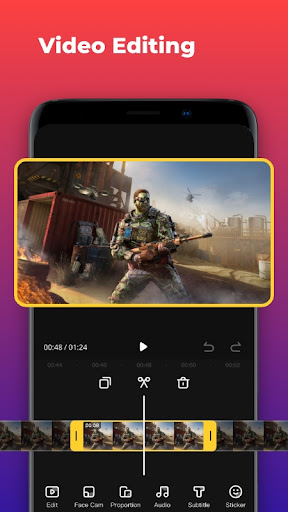
Download the RECGO Screen Recorder and capture anything you desire! It records your favorite games, applications, screen audio, video demonstrations, and video calls. After recording the screen, you can enhance your recordings by adding a face camera for video reactions, further improving your recording effects! RECGO is a feature-rich recorder with video editing tools, allowing you to seamlessly start creating YouTube videos right from the app.
FEATURES
✅ No recording time limits, no root required
✅ Easy operation with a floating window, automatic hiding during recording
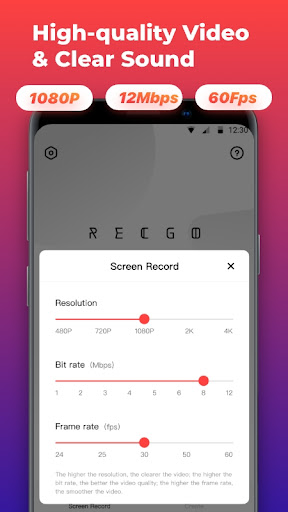
✅ High-quality video recording: 1080p, 12Mbps, 60FPS
✅ Support for internal audio and internal recording (compatible with Android 10+ or newer versions)
✅ Video editing after recording
✅ Face Cam support for recording facial reactions and explanations
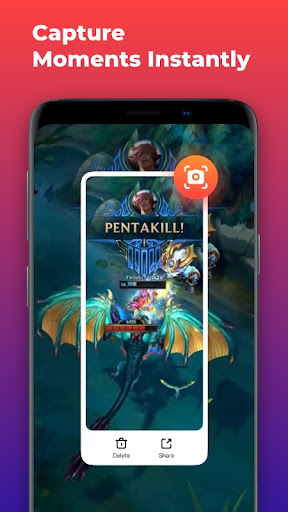
✅ Quick Screenshot Function: Take screenshots swiftly.
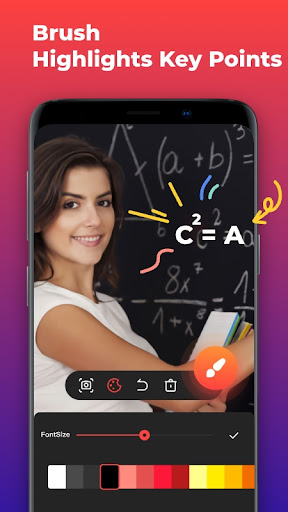
✅ Drawing Tool: Easily highlight important points.
✅ Real-Time Phone Memory Usage Display: Monitor your memory usage as you record.
Professional High-Definition Screen Recorder:
👉 Highest quality recording: 1080p, 12Mbps, 60FPS
👉 Quick launch of screen recording with a floating window, automatic 👉 window hiding during recording
👉Internal audio recording supported for smooth screen recording on Android devices
👉Support for portrait, landscape, and automatic screen recording modes
👉No watermark on recordings
Powerful and Practical Video Editing Tools:
⭐Easy video cropping for quick editing, suitable for beginners
⭐Merge multiple videos into one
⭐A variety of music and sound effects for added enjoyment
⭐Reverse/rotate your recorded videos
⭐Add fun text and stickers to enrich your videos
⭐Popular filters to make your videos unique
⭐Quick adjustment of video volume and aspect ratio
⭐High-resolution video output for easy sharing on social platforms like ⭐Facebook, YouTube, Instagram, etc.
Screen Recorder with Camera:
⭐Facial expressions and emotions can be recorded in a small window for rich voiceovers
⭐Facecam can be freely dragged to any position on the screen
Use Cases:
🎮Record mobile games such as Honor of Kings, PUBG Mobile, etc., and share gaming tips
🎮Game livestream recording with unlimited video recording time, easy playback of livestreams
📖Record tutorials, including classroom lectures, app operation tutorials, micro-courses, etc.
💼Record meetings, chat logs, online videos, and more
Full HD Screen Recording:
Our screen recorder supports the highest quality recording of game screens, providing 1080p resolution, 12Mbps bitrate, and a smooth 60FPS frame rate. Of course, you can freely adjust recording parameters according to your needs, including adjustable resolution (from 480p to 4k), quality, and frame rate (from 24FPS to 60FPS).
Screen Recorder with Camera:
A screen recorder equipped with Facecam can record your facial expressions and reactions in a small window. The window can be freely dragged to any position on the screen for better real-time interaction.
Game Recorder with No Time Limit:
Looking for a recorder to capture glorious moments in games? Our RECGO game recorder allows you to smoothly record game videos with no time limits, ensuring you fully capture and share the exciting moments in gaming.
Experience this feature-packed screen recording software now, the versatile and user-friendly screen recording tool for your phone. Come and start creating your first entertaining video!
Editor's Take
Screen Recorder - Record Video sits at 4.1 stars across 86.2 thousand ratings on Google Play, and is still building an audience.
A rating in this range tells us the core loop works for most players; the usual friction points are cosmetic or balance-tweak territory rather than anything fundamentally broken.
Kevin's Lab is the publisher behind this release; we'd suggest taking a quick look at their other titles on Google Play if the style clicks with you. The last visible update lands 2026-01-07, which is a small but useful signal that the team is still shipping fixes rather than treating the app as abandoned.
Who This App Is For
A quick read on the audiences this app tends to click with, based on its category, content rating and track record on Google Play.
- Family-friendly playersContent is rated Everyone, so it's a safe pick for shared devices.
- Free-tier explorersFree on Google Play, so you can trial the loop before deciding if it earns space on your home screen.
At a Glance
thumb_up What stands out
- Well-received by its audienceSitting above 4 stars on Google Play means most players finish their first session satisfied.
- Free to try on Google PlayNo upfront cost, so you can confirm the loop clicks before committing time or in-app purchases.
- Actively maintainedLast visible update 2026-01-07, suggesting the team is still shipping fixes.
- Known publisherPublished by Kevin's Lab — worth checking their catalogue for similar titles.
info Things to know
- Smaller user baseNiche community means fewer community guides — great for discovery, slower for help with edge cases.
- In-app purchases may applyFree-to-play economics are common in this category — open the Google Play listing to confirm the monetization model before committing.
- Check device compatibilityOlder devices or restricted regions sometimes filter out specific Google Play listings. Confirm on the official page before setting aside time.
Key Features
- ✅ No recording time limits, no root required
- ✅ Easy operation with a floating window, automatic hiding during recording
- ✅ High-quality video recording: 1080p, 12Mbps, 60FPS
- ✅ Support for internal audio and internal recording (compatible with Android 10+ or newer versions)
- ✅ Video editing after recording
- ✅ Face Cam support for recording facial reactions and explanations
- ✅ Quick Screenshot Function: Take screenshots swiftly.
- ✅ Drawing Tool: Easily highlight important points.
App Information
Google Play Rating
Similar Logic Apps You May Like
grid_view Similar apps


























apps More apps you might like