Bluetooth Audio Connect Widget
Tomas Hadraba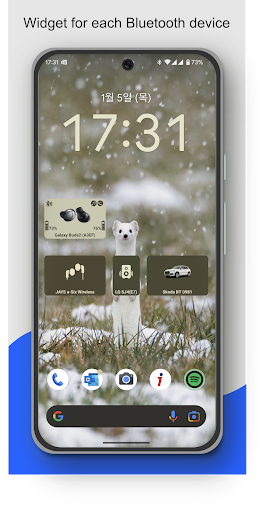


About this app
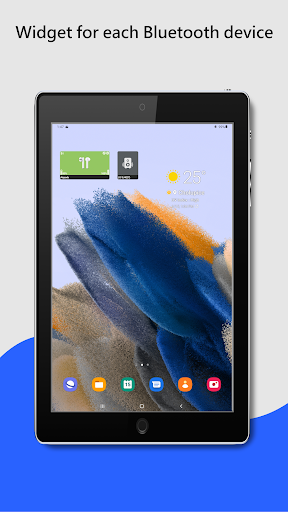
The Widget App & Bluetooth Manager lets you easily connect Bluetooth headphones (or any audio device) right from the home screen – with a separate widget for each device or a single widget listing all your devices.
If you want to listen to music, you have to go to settings and connect Bluetooth headphones?
Do you need to easily switch between car audio, phone or handsfree?
Simply connect to permanently powered Bluetooth devices such as soundbars?
Need to monitor battery level of your Bluetooth headphones?
I have a better solution – just add a widget to the home screen for all your favorite BT wireless devices.
One click on the widget to connect Bluetooth headphones and play Spotify without going into the settings menu. The widget always clearly displays the status of the Bluetooth connection. You can see connected Bluetooth profiles (music, call) on the widget, if headphones support it.
Option to view and change (requires Android 15) the Bluetooth codec used (SBC, AptX, etc.) depending on what your device supports.
For supported devices, the widget displays the battery level of the Bluetooth devices (the manufacturer must support this feature).
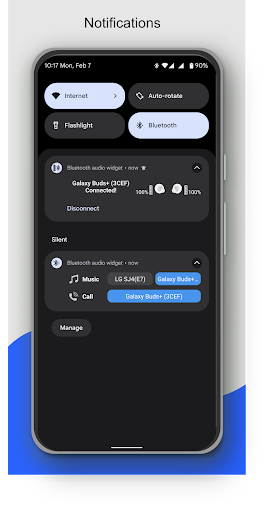
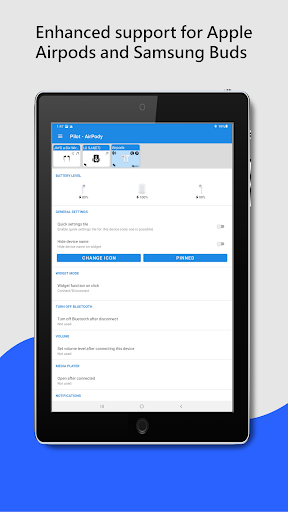
The app supports enhanced reading battery level from the following popular TWS earbuds: Google Pixel, Apple Airpods, Samsung Galaxy Buds Pro, Buds Live, Buds Plus. In the App, on the widget or in notification you can see the battery level of each earbud and the case.
Enhanced widget mode: Widget tap to displays a menu with options to connect / disconnect, select the active device and control Bluetooth profiles (music, call).
Restore saved volume level when headphones connect.
Customize widget size, color, margins, icon and transparency. On Android 12+, the widget supports dynamic color themes based on the user's wallpaper.
The app supports A2DP and Headset profiles, audio devices such as portable speakers, headphones, soundbars, handsfree, etc... On the widget and in the app, supported Bluetooth profiles are indicated by an icon in the top right corner. Note icon for A2DP - stream high quality audio (music) or phone icon for calls.
For help, visit: https://bluetooth-audio-device-widget.webnode.cz/help/
To avoid background restrictions: https://dontkillmyapp.com
Highlighted features:
✔️ Easy Headphones connect / disconnect
✔️ Easy connect / disconnect Bluetooth profiles (calls, music)
✔️ Switch BT audio output (active device)
✔️ Display info about codec
✔️ Info about connected Bluetooth profiles
✔️ Battery status (needs Android 8.1, not all devices support it)
✔️ Enhanced battery status for following TWS earbuds: Google Pixel, Apple Airpods, Samsung Galaxy Buds Pro, Buds Live, Buds Plus
✔️ Widget customization - colors, image, transparency, size
✔️ Open App after connecting (e.g. Spotify)
✔️ Set volume level after connect Bluetooth headphones
✔️ Notification when Bluetooth headphones is connected / disconnected
✔️ Quick settings tile
✔️ Auto resume of playback - Spotify and YouTube Music is supported
Not supported features:
❌ Dual audio playback not supported - this is currently not possible on Android, sorry. In the near future it will be solved by Bluetooth LE Audio.
❌ Bluetooth Scanner - App uses already paired Bluetooth devices!
If you are happy with my App, please take a minute to write a review or give me rating ☆☆☆☆☆👍. If not, feel free to contact me. I'm sure we can solve it :-)

Editor's Take
Bluetooth Audio Connect Widget sits at 4.3 stars across 30.3 thousand ratings on Google Play, and is still building an audience.
A rating in this range tells us the core loop works for most players; the usual friction points are cosmetic or balance-tweak territory rather than anything fundamentally broken.
Tomas Hadraba is the publisher behind this release; we'd suggest taking a quick look at their other titles on Google Play if the style clicks with you. The last visible update lands 2026-02-04, which is a small but useful signal that the team is still shipping fixes rather than treating the app as abandoned.
Who This App Is For
A quick read on the audiences this app tends to click with, based on its category, content rating and track record on Google Play.
- Family-friendly playersContent is rated Everyone, so it's a safe pick for shared devices.
- Free-tier explorersFree on Google Play, so you can trial the loop before deciding if it earns space on your home screen.
At a Glance
thumb_up What stands out
- Well-received by its audienceSitting above 4 stars on Google Play means most players finish their first session satisfied.
- Free to try on Google PlayNo upfront cost, so you can confirm the loop clicks before committing time or in-app purchases.
- Actively maintainedLast visible update 2026-02-04, suggesting the team is still shipping fixes.
- Known publisherPublished by Tomas Hadraba — worth checking their catalogue for similar titles.
info Things to know
- Smaller user baseNiche community means fewer community guides — great for discovery, slower for help with edge cases.
- In-app purchases may applyFree-to-play economics are common in this category — open the Google Play listing to confirm the monetization model before committing.
- Check device compatibilityOlder devices or restricted regions sometimes filter out specific Google Play listings. Confirm on the official page before setting aside time.
App Information
Google Play Rating
Similar Logic Apps You May Like
grid_view Similar apps
























apps More apps you might like