


About this app
Would you like to change your sport tracking application and keep your activities? Or maybe you use 2 or more of these services and would you like to have them synchronized? Now you can do all this with SyncMyTracks!
- What is SyncMyTracks?
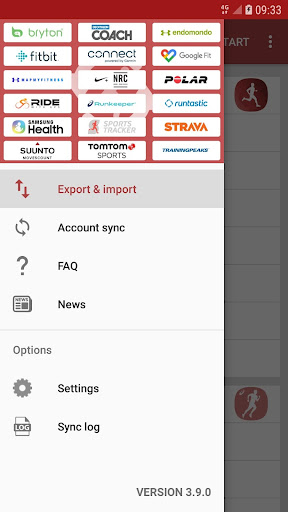
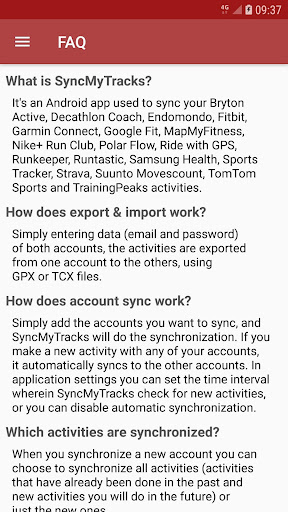
It's an Android app used to sync your activities of the most popular sports tracking services. You can see the list of supported services by SyncMyTracks here: http://syncmytracks.com/#compatibility
- How does export & import work?
Simply entering data (email and password) of both accounts, the activities are exported from one account to the others, using GPX or TCX files.
- How does account sync work?
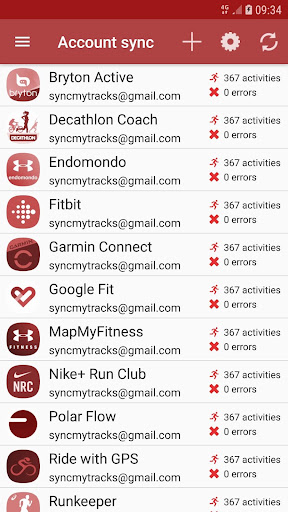
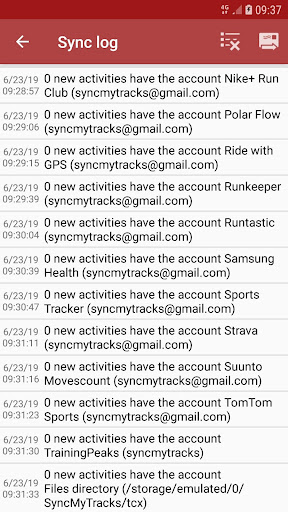
Simply add the accounts you want to sync, and SyncMyTracks will do the synchronization. If you make a new activity with any of your accounts, it automatically syncs to the others accounts. In application settings you can set the time interval wherein SyncMyTracks check for new activities, or you can disable automatic synchronization.
- Which activities are synchronized?
When you synchronize a new account you can choose to synchronize all activities (activities that have already been done in the past and new activities you will do in the future) or just the new ones.
- What data is synchronized?
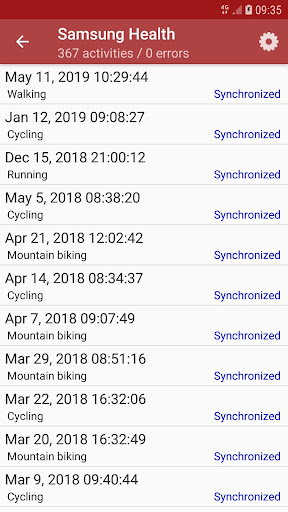
SyncMyTracks synchronizes activity path information, such as time, duration, distance, pace and map. Also the heart rate, cadence, power and temperature are synchronized, when they are supported by different services.
- Can SyncMyTracks delete or modify my activities in synchronization?
Never! SyncMyTracks just adds activities to your accounts, it doesn't delete or modify the activities that you already have.
- Can SyncMyTracks duplicate my activities in synchronization?
SyncMyTracks prevents duplication of activities considering the start time of the activity.
- Where are emails and passwords of my accounts saved?
SyncMyTracks stores this data on your mobile. Passwords are stored using encryption. This data is only used to connect the accounts.
- What are the differences between the free version and the paid version?
In the free version, account sync is unavailable. Only you can export and import your activities. In addition, in the free version you can only export the last 40 activities at most. The paid version contains no ads.
- Can you use the export and import and synchronization with the same accounts?
Not recommended, it could create duplicate activities already synchronized.
- Can you use Facebook or Google+ to login and sync my accounts?
No. You must use your email and password. If password is not set, you must generate it in your account settings.
- Is SyncMyTracks sponsored, maintained or supported it by tracking services supported?
No, SyncMyTracks is independent of them. Therefore, be sure to use the application on the terms and conditions detailed on their respective web sites.
- How do I contact the developer of the application?
Via e-mail ([email protected]) or via Twitter (http://twitter.com/SyncMyTracks).
Editor's Take
SyncMyTracks sits at 2.6 stars across 5.1 thousand ratings on Google Play, and is still building an audience.
Review volume is mixed enough that we'd recommend skimming a few recent Google Play reviews before you invest, especially on devices older than a couple of years.
SyncMyTracks is the publisher behind this release; we'd suggest taking a quick look at their other titles on Google Play if the style clicks with you. The last visible update lands 2026-02-12, which is a small but useful signal that the team is still shipping fixes rather than treating the app as abandoned.
Who This App Is For
A quick read on the audiences this app tends to click with, based on its category, content rating and track record on Google Play.
- Family-friendly playersContent is rated Everyone, so it's a safe pick for shared devices.
At a Glance
thumb_up What stands out
- One-time purchase optionPaid titles like this one ($3.49) tend to skip the aggressive ad patterns you see in free-to-play alternatives.
- Actively maintainedLast visible update 2026-02-12, suggesting the team is still shipping fixes.
- Known publisherPublished by SyncMyTracks — worth checking their catalogue for similar titles.
info Things to know
- Recent reviews worth a readThe average score is mixed enough that a two-minute scan of recent Google Play reviews will save you time later.
- Smaller user baseNiche community means fewer community guides — great for discovery, slower for help with edge cases.
- Check device compatibilityOlder devices or restricted regions sometimes filter out specific Google Play listings. Confirm on the official page before setting aside time.
Key Features
- - What is SyncMyTracks?
- - How does export & import work?
- - How does account sync work?
- - Which activities are synchronized?
- - What data is synchronized?
- - Can SyncMyTracks delete or modify my activities in synchronization?
- - Can SyncMyTracks duplicate my activities in synchronization?
- - Where are emails and passwords of my accounts saved?
App Information
Google Play Rating
Similar Logic Apps You May Like
grid_view Similar apps



























apps More apps you might like