Dropsync: Autosync for Dropbox

Dropsync: Autosync for Dropbox

MetaCtrl
star4.740.9K ratings
download1,000,000+Downloads
family_restroomEveryoneRated for
open_in_new Google Play smartphone Android
update
Updated2026-02-19
new_releases
VersionVaries with device
android
RequiresAndroid 5.0+
category
CategoryProductivity
price_check
PriceFree
family_restroom
ContentEveryone
Dropsync: Autosync for Dropbox screenshot 1Dropsync: Autosync for Dropbox screenshot 2Dropsync: Autosync for Dropbox screenshot 3Dropsync: Autosync for Dropbox screenshot 4Dropsync: Autosync for Dropbox screenshot 5Dropsync: Autosync for Dropbox screenshot 6Dropsync: Autosync for Dropbox screenshot 7Dropsync: Autosync for Dropbox screenshot 8

info About this app

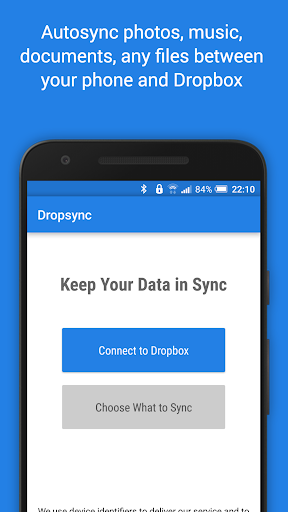
This app is an automatic file sync and backup tool. It lets you automatically synchronize files and folders with Dropbox cloud storage and with your other devices. It is an ideal tool for photo sync, document and file backup, automatic file transfer, automatic file sharing between devices,...

New files in your cloud account are automatically downloaded onto your device. New files in your device are uploaded. If you delete a file on one side, it will be deleted on the other side. It works across multiple devices (your phone and your tablet). If their folders are synced with the same cloud account, they will be kept in sync with each other.

This is how Dropbox works on computers but not on Android. Two-way automatic synchronization should be an essential function of the official app. For whatever reason, it is not the case. Dropsync is here to fill the gap.

All file transfers and communications between user devices and cloud storage servers are securely encrypted and do not go through our servers. No outsiders will be able to decrypt, see or modify any file contents.

MAIN FEATURES

• Full two-way automatic synchronization of files and folders
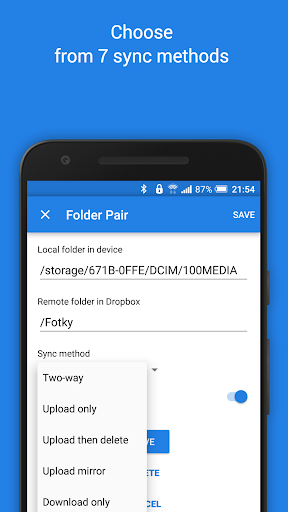
• Many sync modes. Not only two-way, you can also choose Upload only, Upload then delete, Download only, Download mirror,...
• Very efficient, consumes almost no battery
• Easy to set up. Once set up files will be kept in sync without any effort from users
• Works reliably under ever changing network conditions on your phone
• Monitors battery level, WiFi/3G/4G/LTE connectivity and adapts its behavior according to user preferences
• Configurable autosync interval: 15 minutes, 30 minutes, every hour,...

If you like this app, please consider upgrading to premium version. By doing so you support the development efforts and get access to premium features. You can upgrade via in-app purchase.

PREMIUM FEATURES

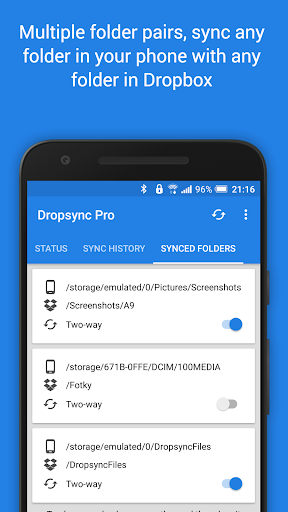
• Sync multiple pairs of folders
• Upload files larger than 10 MB
• Smart change detection (fast sync!)
• Sync your entire cloud account with a folder in your device
• Sync with multiple accounts
• Protect app settings with passcode
• No ads displayed in the app
• Email support by developer

SUPPORT

Please check out our website (http://metactrl.com/) for more information about the app, including User's Guide (http://metactrl.com/userguide/) and FAQ (http://metactrl.com/faq/). If you run into any issues or have suggestions for improvements, don't hesitate to email us at [email protected]. We will do our best to assist you.

ProductivityEveryoneFree

rate_review Editor's Take

Dropsync: Autosync for Dropbox sits at 4.7 stars across 40.9 thousand ratings on Google Play, and is still building an audience.

That score is hard to fake on a productivity app — it usually signals a tool that stays out of your way, does one thing well, and doesn't pepper you with upsells.

MetaCtrl is the publisher behind this release; we'd suggest taking a quick look at their other titles on Google Play if the style clicks with you. The last visible update lands 2026-02-19, which is a small but useful signal that the team is still shipping fixes rather than treating the app as abandoned.

groups Who This App Is For

A quick read on the audiences this app tends to click with, based on its category, content rating and track record on Google Play.

  • family_restroom
    Family-friendly playersContent is rated Everyone, so it's a safe pick for shared devices.
  • work
    Power usersBuilt for people who want a focused utility, not a feed.
  • trending_up
    Quality-first downloadersConsistently high ratings make this a low-risk trial, even at full volume on a new device.
  • payments
    Free-tier explorersFree on Google Play, so you can trial the loop before deciding if it earns space on your home screen.

fact_check At a Glance

thumb_up What stands out

  • star
    Consistent high ratingsA 4.7-star average across 40.9 thousand ratings is a strong quality signal.
  • payments
    Free to try on Google PlayNo upfront cost, so you can confirm the loop clicks before committing time or in-app purchases.
  • schedule
    Actively maintainedLast visible update 2026-02-19, suggesting the team is still shipping fixes.
  • verified
    Known publisherPublished by MetaCtrl — worth checking their catalogue for similar titles.

info Things to know

  • explore
    Smaller user baseNiche community means fewer community guides — great for discovery, slower for help with edge cases.
  • attach_money
    In-app purchases may applyFree-to-play economics are common in this category — open the Google Play listing to confirm the monetization model before committing.
  • phone_android
    Check device compatibilityOlder devices or restricted regions sometimes filter out specific Google Play listings. Confirm on the official page before setting aside time.

auto_awesome Key Features

  • check_circle• Full two-way automatic synchronization of files and folders
  • check_circle• Many sync modes. Not only two-way, you can also choose Upload only, Upload then delete, Download only, Download mirror,...
  • check_circle• Very efficient, consumes almost no battery
  • check_circle• Easy to set up. Once set up files will be kept in sync without any effort from users
  • check_circle• Works reliably under ever changing network conditions on your phone
  • check_circle• Monitors battery level, WiFi/3G/4G/LTE connectivity and adapts its behavior according to user preferences
  • check_circle• Configurable autosync interval: 15 minutes, 30 minutes, every hour,...
  • check_circle• Sync multiple pairs of folders

assignment App Information

DeveloperMetaCtrl
CategoryProductivity
Downloads1,000,000+
Current VersionVaries with device
Last Updated2026-02-19
Content RatingEveryone
PriceFree
Official StoreView on Google Play

star Google Play Rating

4.7
starstarstarstarstar
40.9K ratings on Google Play

Rating data is sourced from the Google Play Store. For the latest user reviews, visit the official app page.

psychology Similar Logic Apps You May Like

grid_view Similar apps

apps More apps you might like