About this app
Get the official Google Calendar app, for your Android phone, tablet, or Wear OS device to stay organized and plan your day. Make the most of your day with easy event creation, multiple calendars, customizable views, widgets, tasks, and more
With Google Calendar, you can:
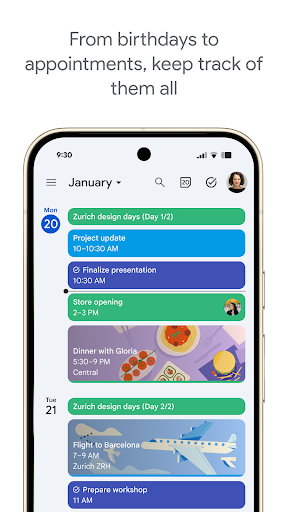
• Get events automatically added to your Calendar from Gmail, including flight, hotel, concert, and restaurant reservations.
• Go from using Calendar on your Android phone, tablet, or Wear OS device to your computer without missing a beat when you’re logged into the same Google account.
• Consolidate and view Google Calendar events side-by-side with other calendars on your device, including Exchange.
• Keep family, friends, and colleagues in the loop with shared calendars, so they can view, add, or modify events.
• Quickly switch between month, week, and day views.
• Stay on top of to-dos by creating and managing tasks alongside your events in Calendar.
• Personalize your Google Calendar with light or dark mode or by color-coding your events.
• Access and organize your task lists in a full-screen view right from the Google Calendar app.
• Keep track of events or tasks while on the go with Google Calendar on Wear OS devices, which supports tiles and complications.
Google Calendar is part of Google Workspace, allowing you and your team to easily connect, create, and collaborate across all your favorite Google tools. You can:
• Collaborate in a hybrid work environment by adding a Google Meet video call to an Calendar event
• Get access to professional booking pages to easily book clients and customers*.
• Schedule meetings with teammates by checking their availability or layering their calendars in a single view
• Add your working location to your calendar to make it easier for your teammates to schedule meetings with you*.
• Keep everyone on track for a meeting by attaching meeting notes, pre-read materials, and other documents directly to a calendar event.
• Use Google Calendar with confidence knowing it’s supported by Google’s enterprise-level privacy, user safety and data security.
Learn more about Google Workspace: https://workspace.google.com/products/calendar/
Follow us for more:
X: https://x.com/googleworkspace
LinkedIn: https://www.linkedin.com/showcase/googleworkspace
Facebook: https://www.facebook.com/googleworkspace/
Editor's Take
Google Calendar sits at 4.7 stars across 4.4 million ratings on Google Play, and is still building an audience.
That score is hard to fake on a productivity app — it usually signals a tool that stays out of your way, does one thing well, and doesn't pepper you with upsells.
Google LLC is the publisher behind this release; we'd suggest taking a quick look at their other titles on Google Play if the style clicks with you. The last visible update lands 2026-02-26, which is a small but useful signal that the team is still shipping fixes rather than treating the app as abandoned.
Who This App Is For
A quick read on the audiences this app tends to click with, based on its category, content rating and track record on Google Play.
- Family-friendly playersContent is rated Everyone, so it's a safe pick for shared devices.
- Power usersBuilt for people who want a focused utility, not a feed.
- Quality-first downloadersConsistently high ratings make this a low-risk trial, even at full volume on a new device.
- Free-tier explorersFree on Google Play, so you can trial the loop before deciding if it earns space on your home screen.
At a Glance
thumb_up What stands out
- Consistent high ratingsA 4.7-star average across 4.4 million ratings is a strong quality signal.
- Free to try on Google PlayNo upfront cost, so you can confirm the loop clicks before committing time or in-app purchases.
- Actively maintainedLast visible update 2026-02-26, suggesting the team is still shipping fixes.
- Known publisherPublished by Google LLC — worth checking their catalogue for similar titles.
info Things to know
- Smaller user baseNiche community means fewer community guides — great for discovery, slower for help with edge cases.
- In-app purchases may applyFree-to-play economics are common in this category — open the Google Play listing to confirm the monetization model before committing.
- Check device compatibilityOlder devices or restricted regions sometimes filter out specific Google Play listings. Confirm on the official page before setting aside time.
Key Features
- • Get events automatically added to your Calendar from Gmail, including flight, hotel, concert, and restaurant reservations.
- • Go from using Calendar on your Android phone, tablet, or Wear OS device to your computer without missing a beat when you’re logged into the same Google account.
- • Consolidate and view Google Calendar events side-by-side with other calendars on your device, including Exchange.
- • Keep family, friends, and colleagues in the loop with shared calendars, so they can view, add, or modify events.
- • Quickly switch between month, week, and day views.
- • Stay on top of to-dos by creating and managing tasks alongside your events in Calendar.
- • Personalize your Google Calendar with light or dark mode or by color-coding your events.
- • Access and organize your task lists in a full-screen view right from the Google Calendar app.