About this app
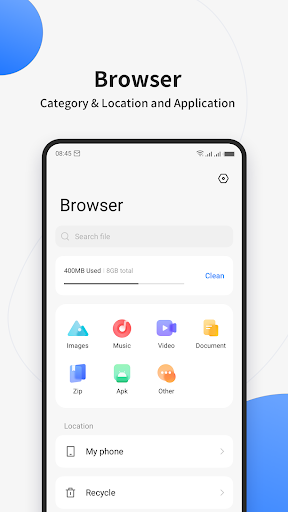
File Manager + is an easy and powerful file explorer for Android devices. It’s free, fast and full-featured. Because of its simple UI, it’s extremely easy to use. You can easily manage storages on your device, NAS(Network-attached storage), and cloud storages. What’s more, you can find how many files & apps you have on your device at a glance immediately after opening the app.
It supports every file management action (open, search, navigate directory, copy and paste, cut, delete, rename, compress, decompress, transfer, download, bookmark, and organize) for various file formats including media and apk.
Major locations and functions of File Manager Plus are as following:
• Main Storage / SD card / USB OTG : You can manage all files and folders on both your internal storage and external storage.
• Downloads / New files / Images / Audio / Videos / Documents : Your files and folders are automatically sorted by their types and characteristics so that you can easily find what you are looking for.
• Apps : You can see and manage all applications installed on your local device.
• Cloud / Remote : You can access your cloud storage and also remote/shared storage like NAS and FTP server. (Cloud storage: Google Drive™, OneDrive, Dropbox, Box, and Yandex)
• Access from PC : You can access your android device storage from PC using FTP(File Transfer Protocol).
• Storage analysis : You can analyze local storages to clean up useless files. You can find out which files and apps take up the most space.
• Internal image viewer / Internal music player/ Internal text editor : You can choose to use built-in utilities for faster and better performance.
• Archive management : You can compress and decompress archive files.
- Supported compression archives : zip
- Supported decompression archives : zip, gz, xz, tar
• Supported devices : Android TV, phone and tablet.
Editor's Take
File Manager sits at 4.7 stars across 1.7 million ratings on Google Play, and is still building an audience.
That score is hard to fake on a productivity app — it usually signals a tool that stays out of your way, does one thing well, and doesn't pepper you with upsells.
File Manager Plus is the publisher behind this release; we'd suggest taking a quick look at their other titles on Google Play if the style clicks with you. The last visible update lands 2026-02-22, which is a small but useful signal that the team is still shipping fixes rather than treating the app as abandoned.
Who This App Is For
A quick read on the audiences this app tends to click with, based on its category, content rating and track record on Google Play.
- Family-friendly playersContent is rated Everyone, so it's a safe pick for shared devices.
- Power usersBuilt for people who want a focused utility, not a feed.
- Quality-first downloadersConsistently high ratings make this a low-risk trial, even at full volume on a new device.
- Free-tier explorersFree on Google Play, so you can trial the loop before deciding if it earns space on your home screen.
At a Glance
thumb_up What stands out
- Consistent high ratingsA 4.7-star average across 1.7 million ratings is a strong quality signal.
- Free to try on Google PlayNo upfront cost, so you can confirm the loop clicks before committing time or in-app purchases.
- Actively maintainedLast visible update 2026-02-22, suggesting the team is still shipping fixes.
- Known publisherPublished by File Manager Plus — worth checking their catalogue for similar titles.
info Things to know
- Smaller user baseNiche community means fewer community guides — great for discovery, slower for help with edge cases.
- In-app purchases may applyFree-to-play economics are common in this category — open the Google Play listing to confirm the monetization model before committing.
- Check device compatibilityOlder devices or restricted regions sometimes filter out specific Google Play listings. Confirm on the official page before setting aside time.
Key Features
- • Main Storage / SD card / USB OTG : You can manage all files and folders on both your internal storage and external storage.
- • Apps : You can see and manage all applications installed on your local device.
- • Cloud / Remote : You can access your cloud storage and also remote/shared storage like NAS and FTP server. (Cloud storage: Google Drive™, OneDrive, Dropbox, Box, and Yandex)
- • Access from PC : You can access your android device storage from PC using FTP(File Transfer Protocol).
- • Storage analysis : You can analyze local storages to clean up useless files. You can find out which files and apps take up the most space.
- • Internal image viewer / Internal music player/ Internal text editor : You can choose to use built-in utilities for faster and better performance.
- • Archive management : You can compress and decompress archive files.
- - Supported compression archives : zip