About this app
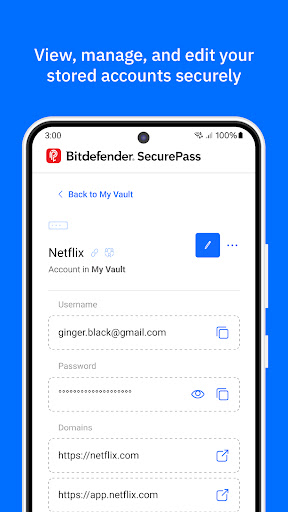
Stay safe online with Bitdefender SecurePass, the password manager built for those who take security seriously.. Powered by advanced end-to-end encryption technology, SecurePass protects your passwords, credit card details, and sensitive information across all your devices. Whether you manage hundreds of accounts or just a few, SecurePass takes the hassle out of remembering passwords and gives you vault-like security.
Key Features:
🔐Complete Protection : Secure your passwords and sensitive data with end-to-end encryption, keeping your online accounts and personal information completely private.
🛡️Password Generator & Strength Advisor: Create strong, complex passwords with just one click. Use the built-in advisor to check if any of your existing passwords are weak or require attention.
📲Multi-platform Synchronization: Save and sync your passwords across multiple platforms, including Android, iOS, Windows, macOS, and all major browsers like Chrome, Firefox, Safari, and Edge. Access your password manager vault anytime, anywhere.
🔑Master Password Convenience: Manage all your accounts with just one Master Password. SecurePass eliminates the need to remember dozens of login details by centralizing everything in one secure password manager.
💳Secure Credit Card Management: Protect your payment details for online shopping. Autofill your credit card information on websites safely, knowing that your sensitive data is encrypted and stored locally on your device.
🖥️Easy Import/Export: Transitioning from another password manager? SecurePass makes it easy to import your data from 1Password, Dashlane, LastPass, Chrome, Firefox, and more. Supported file formats include JSON, CSV, and XML.
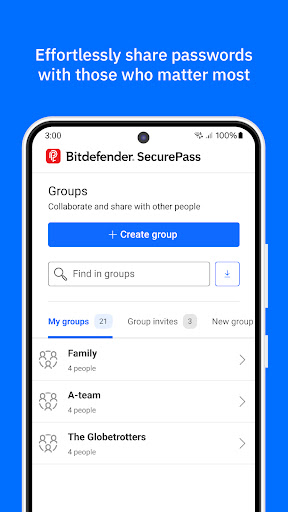
👥Share Passwords Safely: Need to share passwords with family or colleagues? Use SecurePass to share credentials securely, thanks to encrypted password sharing.
🔔Password Leak Alerts: SecurePass constantly monitors data breaches to alert you if any of your credentials are exposed, giving you a chance to update your passwords before it’s too late.
Additional Features:
• Two-Factor Authentication: Add an extra layer of security to your password vault.
• Secure Notes: Store sensitive information like documents, personal notes, or PIN codes with color-coded organization.
• Identities Management: Manage multiple online identities with ease, autofilling your details for fast form completion.
• Auto-Lock & Secure Me Feature: Automatically log out or lock your vault after inactivity or on shared devices.
• Face & Fingerprint Unlock: Quickly access your vault with biometric authentication on supported devices.
Why Choose Bitdefender SecurePass?
Bitdefender SecurePass is designed for users who value privacy and need top-tier protection for their online identities. As a powerful and intuitive password manager, SecurePass offers a seamless way to manage your digital life without compromising on security. Whether you’re shopping online, managing work accounts, or simply keeping track of personal passwords, SecurePass has your back!
Editor's Take
Bitdefender SecurePass sits at 4.4 stars across 1.2 thousand ratings on Google Play, and is still building an audience.
A rating in this range tells us the core loop works for most players; the usual friction points are cosmetic or balance-tweak territory rather than anything fundamentally broken.
Bitdefender is the publisher behind this release; we'd suggest taking a quick look at their other titles on Google Play if the style clicks with you. The last visible update lands 2025-11-14, which is a small but useful signal that the team is still shipping fixes rather than treating the app as abandoned.
Who This App Is For
A quick read on the audiences this app tends to click with, based on its category, content rating and track record on Google Play.
- Family-friendly playersContent is rated Everyone, so it's a safe pick for shared devices.
- Power usersBuilt for people who want a focused utility, not a feed.
- Free-tier explorersFree on Google Play, so you can trial the loop before deciding if it earns space on your home screen.
At a Glance
thumb_up What stands out
- Consistent high ratingsA 4.4-star average across 1.2 thousand ratings is a strong quality signal.
- Free to try on Google PlayNo upfront cost, so you can confirm the loop clicks before committing time or in-app purchases.
- Actively maintainedLast visible update 2025-11-14, suggesting the team is still shipping fixes.
- Known publisherPublished by Bitdefender — worth checking their catalogue for similar titles.
info Things to know
- Smaller user baseNiche community means fewer community guides — great for discovery, slower for help with edge cases.
- In-app purchases may applyFree-to-play economics are common in this category — open the Google Play listing to confirm the monetization model before committing.
- Check device compatibilityOlder devices or restricted regions sometimes filter out specific Google Play listings. Confirm on the official page before setting aside time.
Key Features
- 🔐Complete Protection : Secure your passwords and sensitive data with end-to-end encryption, keeping your online accounts and personal information completely private.
- 🛡️Password Generator & Strength Advisor: Create strong, complex passwords with just one click. Use the built-in advisor to check if any of your existing passwords are weak or require attention.
- 👥Share Passwords Safely: Need to share passwords with family or colleagues? Use SecurePass to share credentials securely, thanks to encrypted password sharing.
- 🔔Password Leak Alerts: SecurePass constantly monitors data breaches to alert you if any of your credentials are exposed, giving you a chance to update your passwords before it’s too late.
- • Two-Factor Authentication: Add an extra layer of security to your password vault.
- • Secure Notes: Store sensitive information like documents, personal notes, or PIN codes with color-coded organization.
- • Identities Management: Manage multiple online identities with ease, autofilling your details for fast form completion.
- • Auto-Lock & Secure Me Feature: Automatically log out or lock your vault after inactivity or on shared devices.