About this app
Easily Backup and Restore All Your Phone Data in One Tap!
With just a few taps, you can back up all your important data to your Google Drive, SD card, or local storage, giving you complete peace of mind that your information is always safe, secure, and accessible.
Whether you’re switching to a new phone or simply want to protect your files, this all-in-one Backup & Restore app makes it easy to back up and restore your contacts, messages, apps, and media files anytime.
📦 Key Features:
✓ All-in-One Backup Solution
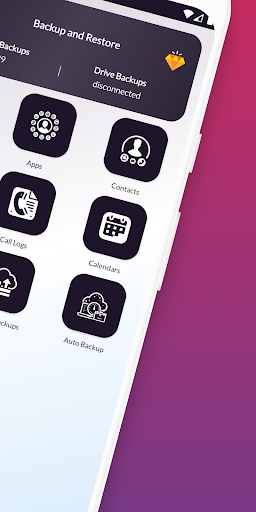
Back up Contacts, SMS, Call Logs, Calendar, Apps (APK files) and now Media Files — all from one app.
✓ NEW: Media Backup
Securely back up your Photos, Documents, Audio files, APKs, and Archives (ZIP/RAR) while keeping the original folder structure intact.
✓ Cloud, Local & SD Card Backup
Save backups to your phone storage, SD card, or Google Drive — you choose.
✓ Fast & Easy Restore
Restore your data in seconds from SD card, local, or Drive backups.
✓ Manage Backups Easily
Upload, download, restore, or delete backups from local storage, SD card, or Google Drive.
✓ Auto Backup
Automatically back up your data daily, weekly, or on a custom schedule.
✓ Safe & Private
Your data stays on your device, SD card, or your own Google Drive — we never access, upload, or share your files.
💡 How It Works:
✦ Backup:
• Choose what you want to back up — Contacts, SMS, Call Logs, Calendar, Apps, or Media Files
• Select backup location (Google Drive, SD card, or Local Storage)
• Tap Start Backup — done!
✦ Media Backup:
• Select file types (Photos, Documents, Audio, APKs, Archives)
• Choose folders or perform a full media backup
• Files are backed up securely with folder structure preserved
✦ Advanced Backup:
• Select specific items or folders for a custom backup experience
✦ Restore:
• Go to Restore / Manage Backup
• Choose what you want to restore
• The app runs safely in the background and notifies you when finished
✦ Manage Backups:
• Local & SD card backups: Upload to Drive, restore, or delete
• Drive backups: Download to phone, SD card, or restore directly
⚙️ Permissions Required:
• Storage access – To create and manage backup files
• Contacts, SMS, Call Logs, Calendar – For backup & restore functionality
• Google Drive access (optional) – For cloud backups
⚠️ Important Note:
This app does not back up app data. Only APK files are backed up and restored.
🔒 Keep your data safe, organized, and always accessible.
📲 Download now and back up everything that matters — in just one tap!
Editor's Take
Backup and Restore All sits at 4.4 stars across 672 ratings on Google Play, and is still building an audience.
A rating in this range tells us the core loop works for most players; the usual friction points are cosmetic or balance-tweak territory rather than anything fundamentally broken.
ColdFusion is the publisher behind this release; we'd suggest taking a quick look at their other titles on Google Play if the style clicks with you.
Who This App Is For
A quick read on the audiences this app tends to click with, based on its category, content rating and track record on Google Play.
- Family-friendly playersContent is rated Everyone, so it's a safe pick for shared devices.
- Power usersBuilt for people who want a focused utility, not a feed.
- Free-tier explorersFree on Google Play, so you can trial the loop before deciding if it earns space on your home screen.
At a Glance
thumb_up What stands out
- Consistent high ratingsA 4.4-star average across 672 ratings is a strong quality signal.
- Free to try on Google PlayNo upfront cost, so you can confirm the loop clicks before committing time or in-app purchases.
- Known publisherPublished by ColdFusion — worth checking their catalogue for similar titles.
info Things to know
- Smaller user baseNiche community means fewer community guides — great for discovery, slower for help with edge cases.
- In-app purchases may applyFree-to-play economics are common in this category — open the Google Play listing to confirm the monetization model before committing.
- Check device compatibilityOlder devices or restricted regions sometimes filter out specific Google Play listings. Confirm on the official page before setting aside time.
- Update cadence unclearNo recent update date surfaced here; look at the Google Play listing to confirm active maintenance.
Key Features
- 📦 Key Features:
- ✓ All-in-One Backup Solution
- ✓ NEW: Media Backup
- ✓ Cloud, Local & SD Card Backup
- ✓ Fast & Easy Restore
- ✓ Manage Backups Easily
- ✓ Auto Backup
- ✓ Safe & Private