About this app
Get the password manager created by the scientists who met at CERN behind Proton Mail, the world’s largest encrypted email provider. Proton Pass is open source, end-to-end encrypted, and protected by Swiss privacy laws.
Pass offers more than other free password managers and has no ads or data collection. You can use it for free forever on all your devices to create and store unlimited passwords, autofill logins, generate 2FA codes, create email aliases, secure your notes, and more.
* How can Proton Pass be free forever?
We offer Pass for free because everyone deserves online privacy and security. This is possible thanks to our supportive community on paid plans. If you would like to support our work and get access to premium features, consider upgrading your plan.
* Protect more than just your passwords.
Join over 100 million people who have signed up for Proton’s privacy ecosystem, which includes Proton Mail, Proton Drive, Proton Calendar, Proton VPN, and more.
* Protect your logins and their metadata with battle-tested end-to-end encryption
While many other password managers only encrypt your password, Proton Pass uses end-to-end encryption on all your stored login details (including your username, the website address, and more). Pass protects your information with the same battle-tested encryption libraries all Proton services use.
* Audit Pass’s open-source code
Like all other Proton services, Pass is open source and built on the principle of trust through transparency. As scientists, we know that transparency and peer review lead to better security. All Proton Pass apps are open source, meaning anyone can verify our security claims for themselves.
With Proton Pass, you can:
- Store and auto-sync unlimited logins on unlimited devices: You can create, store, and manage your credentials from anywhere with our browser extensions and apps for Android and iPhone/iPad.
- Sign in faster with Proton Pass autofill: You no longer need to copy and paste your username and password. Easily and securely log in with Proton Pass autofill technology.
- Avoid weak passwords: With our built-in secure password generator, you can easily generate strong, unique, and random passwords based on the security requirements for every website you sign up to.
- Safely store encrypted notes: You can save private notes in Pass and access them on all your devices.
- Protect Proton Pass with biometric login access: You can add an extra layer of protection to Proton Pass by using your fingerprint or face to unlock the app.
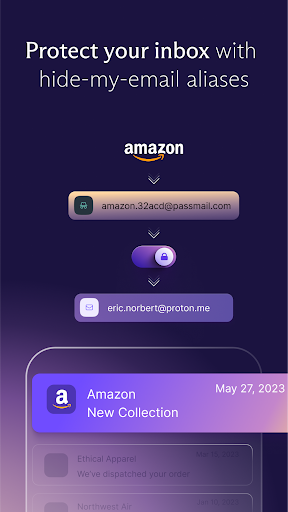
- Create unique email addresses with hide-my-email aliases: Proton Pass helps you hide your personal email address with email aliases. Keep spam out of your inbox, avoid being tracked everywhere, and protect yourself from data breaches.
- Make 2FA easy with our built-in authenticator: With Pass’s integrated 2FA authenticator, using 2FA is finally fast and convenient. Easily add a 2FA code for any website and autofill it when you log in.
- Easily organize and share your sensitive data with vaults: Manage your logins, secure notes, and email aliases with vaults. In the next version of Pass, you’ll be able to share individual items or an entire vault with your family, friends, or colleagues.
- Quick offline access to your login data: Access your stored passwords and notes in Pass from wherever you are, even when your phone has no internet connection.
- Secure your Pass account with additional security measures: Protect all your data with another layer of protection, either with TOTP or U2F/FIDO2 security keys.
- Get unlimited email forwards: There’s no limit on the number of emails you can have forwarded from your alias to your inbox.
- Easily import your passwords from: Apple iCloud Keychain, Google Chrome, Bitwarden, 1Password, Dashlane, LastPass, Nordpass, Keeper, and more!
For more information, visit: https://proton.me/pass
Learn more about Proton: https://proton.me
Editor's Take
Proton Pass: Password Manager sits at 4.8 stars across 44.6 thousand ratings on Google Play, and is still building an audience.
That score is hard to fake on a productivity app — it usually signals a tool that stays out of your way, does one thing well, and doesn't pepper you with upsells.
Proton AG is the publisher behind this release; we'd suggest taking a quick look at their other titles on Google Play if the style clicks with you. The last visible update lands 2026-02-17, which is a small but useful signal that the team is still shipping fixes rather than treating the app as abandoned.
Who This App Is For
A quick read on the audiences this app tends to click with, based on its category, content rating and track record on Google Play.
- Family-friendly playersContent is rated Everyone, so it's a safe pick for shared devices.
- Power usersBuilt for people who want a focused utility, not a feed.
- Quality-first downloadersConsistently high ratings make this a low-risk trial, even at full volume on a new device.
- Free-tier explorersFree on Google Play, so you can trial the loop before deciding if it earns space on your home screen.
At a Glance
thumb_up What stands out
- Consistent high ratingsA 4.8-star average across 44.6 thousand ratings is a strong quality signal.
- Free to try on Google PlayNo upfront cost, so you can confirm the loop clicks before committing time or in-app purchases.
- Actively maintainedLast visible update 2026-02-17, suggesting the team is still shipping fixes.
- Known publisherPublished by Proton AG — worth checking their catalogue for similar titles.
info Things to know
- Smaller user baseNiche community means fewer community guides — great for discovery, slower for help with edge cases.
- In-app purchases may applyFree-to-play economics are common in this category — open the Google Play listing to confirm the monetization model before committing.
- Check device compatibilityOlder devices or restricted regions sometimes filter out specific Google Play listings. Confirm on the official page before setting aside time.
Key Features
- - Store and auto-sync unlimited logins on unlimited devices: You can create, store, and manage your credentials from anywhere with our browser extensions and apps for Android and iPhone/iPad.
- - Sign in faster with Proton Pass autofill: You no longer need to copy and paste your username and password. Easily and securely log in with Proton Pass autofill technology.
- - Avoid weak passwords: With our built-in secure password generator, you can easily generate strong, unique, and random passwords based on the security requirements for every website you sign up to.
- - Safely store encrypted notes: You can save private notes in Pass and access them on all your devices.
- - Protect Proton Pass with biometric login access: You can add an extra layer of protection to Proton Pass by using your fingerprint or face to unlock the app.
- - Quick offline access to your login data: Access your stored passwords and notes in Pass from wherever you are, even when your phone has no internet connection.
- - Secure your Pass account with additional security measures: Protect all your data with another layer of protection, either with TOTP or U2F/FIDO2 security keys.
- - Get unlimited email forwards: There’s no limit on the number of emails you can have forwarded from your alias to your inbox.