Plan Calendar -Make a Schedule

Plan Calendar -Make a Schedule

Naoki Otsu
star4.8112 ratings
download5,000+Downloads
family_restroomEveryoneRated for
open_in_new Google Play smartphone Android
update
Updated2026-01-07
new_releases
Version5.43.0
android
RequiresAndroid 5.0+
category
CategoryProductivity
price_check
PriceFree
family_restroom
ContentEveryone
Plan Calendar -Make a Schedule screenshot 1Plan Calendar -Make a Schedule screenshot 2Plan Calendar -Make a Schedule screenshot 3Plan Calendar -Make a Schedule screenshot 4Plan Calendar -Make a Schedule screenshot 5Plan Calendar -Make a Schedule screenshot 6Plan Calendar -Make a Schedule screenshot 7Plan Calendar -Make a Schedule screenshot 8Plan Calendar -Make a Schedule screenshot 9Plan Calendar -Make a Schedule screenshot 10

info About this app

Get the ultimate calendar app now!
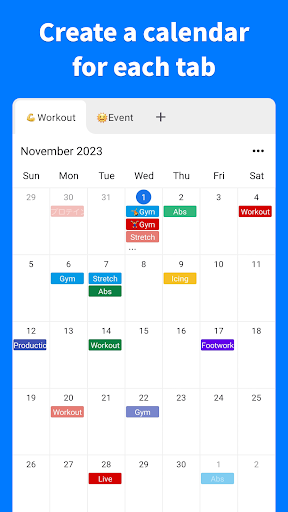
Master complete control of multiple calendars with innovative tab functionality!
The revolutionary app that transforms how you organize your schedule!

◆ One-Tap Schedule Creation
Simply tap any date on the monthly calendar to instantly add events with lightning speed!

◆ Revolutionary Tab System
Perfectly organize calendars by category with advanced tab management! Work, personal, hobbies - categorize and manage everything flawlessly!

◆ Color-Coded Event Creation
Utilize our rich color palette to categorize events! Achieve maximum visual clarity with instant recognition of importance and type!

◆ Lightning-Fast Global Search
Search through all events instantly! Discover your target schedule in seconds from massive data collections!

◆ Automatic Backup and Restore
Device changes made easy! Automatic data backup with instant restoration on new devices!

◆ Light and Dark Mode Support
Beautiful dark mode for optimal eye comfort! Customize perfectly to match your preferences!

◆ Complete Offline Support
Zero internet connection required! Access your data anytime, anywhere, completely!

◆ Smart Notifications
Custom message notifications at your specified times! Never miss important appointments again!

◆ Biometric Authentication
Enhance app security to the highest level with Face ID and fingerprint authentication! Complete privacy protection for your data!

◆ CSV Export
Effortlessly export all your data to CSV files! Perfect data migration and backup solutions!

◆ Tab Memos
Add custom notes to each tab! Keep important category-specific information always accessible!

◆ No Login Required
Skip tedious registration processes entirely! Start your premium experience immediately after download!

◆ Maximum Level Security
Your data remains completely private! Zero external transmission! Safely stored exclusively on your device!

◆ Professional Support
24/7 support coverage! Contact us anytime with questions or concerns.
[email protected]

Privacy Policy: https://naokiotsu.com/privacy-policy

ProductivityEveryoneFree

rate_review Editor's Take

Plan Calendar -Make a Schedule sits at 4.8 stars across 112 ratings on Google Play, and is still building an audience.

That score is hard to fake on a productivity app — it usually signals a tool that stays out of your way, does one thing well, and doesn't pepper you with upsells.

Naoki Otsu is the publisher behind this release; we'd suggest taking a quick look at their other titles on Google Play if the style clicks with you. The last visible update lands 2026-01-07, which is a small but useful signal that the team is still shipping fixes rather than treating the app as abandoned.

groups Who This App Is For

A quick read on the audiences this app tends to click with, based on its category, content rating and track record on Google Play.

  • family_restroom
    Family-friendly playersContent is rated Everyone, so it's a safe pick for shared devices.
  • work
    Power usersBuilt for people who want a focused utility, not a feed.
  • trending_up
    Quality-first downloadersConsistently high ratings make this a low-risk trial, even at full volume on a new device.
  • payments
    Free-tier explorersFree on Google Play, so you can trial the loop before deciding if it earns space on your home screen.

fact_check At a Glance

thumb_up What stands out

  • star
    Consistent high ratingsA 4.8-star average across 112 ratings is a strong quality signal.
  • payments
    Free to try on Google PlayNo upfront cost, so you can confirm the loop clicks before committing time or in-app purchases.
  • schedule
    Actively maintainedLast visible update 2026-01-07, suggesting the team is still shipping fixes.
  • verified
    Known publisherPublished by Naoki Otsu — worth checking their catalogue for similar titles.

info Things to know

  • explore
    Smaller user baseNiche community means fewer community guides — great for discovery, slower for help with edge cases.
  • attach_money
    In-app purchases may applyFree-to-play economics are common in this category — open the Google Play listing to confirm the monetization model before committing.
  • phone_android
    Check device compatibilityOlder devices or restricted regions sometimes filter out specific Google Play listings. Confirm on the official page before setting aside time.

assignment App Information

DeveloperNaoki Otsu
CategoryProductivity
Downloads5,000+
Current Version5.43.0
Last Updated2026-01-07
Content RatingEveryone
PriceFree
Official StoreView on Google Play

star Google Play Rating

4.8
starstarstarstarstar
112 ratings on Google Play

Rating data is sourced from the Google Play Store. For the latest user reviews, visit the official app page.

psychology Similar Logic Apps You May Like

grid_view Similar apps

apps More apps you might like