About this app
Ace Cleaner – Junk Cleaner & File Manager
Managing your device storage doesn’t have to be complicated. Ace Cleaner offers a simple to clean junk files, organize apps, and manage your photos, videos, and documents.
●Clean Junk Files & Cache
Over time, phones accumulate temporary files, cache data, and other items that may take up unnecessary storage. Ace Cleaner scans junk files and allows you to review and remove them.
●App Organizer
With Ace Cleaner’s App Organizer, you can:
View all installed apps
Check storage and data usage for each app
Uninstall apps you no longer need
●Photo & Video Tidy-Up
Screenshots, duplicate images, and old videos can slowly fill your gallery. Ace Cleaner helps you:
Review photos, videos, and documents with ease
Decide what to keep or remove
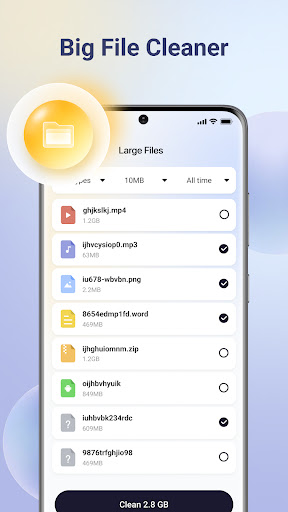
●Large File Finder
Ace Cleaner makes it easy to:
Identify the biggest files on your device
Choose whether to keep or delete them
🔒 On-Device Privacy Protection
All scanning, cleaning, and file management happen locally on your device. None of your personal files are uploaded, collected, or shared.
✨ Designed for Simplicity & Control
Intuitive interface for everyday file management
Combines junk cleaning, app organization, and file management in one tool
Clear choices and transparent actions
Clean junk files, organize apps, tidy up photos, videos, and documents, and locate large files — all within a single app designed to keep you in control and protect your privacy.
Privacy Policy: https://cleanacepl.com/privacy
Editor's Take
Ace Cleaner sits at 3.8 stars across 3 thousand ratings on Google Play, and is still building an audience.
Ratings in this band typically hide a split audience — plenty of satisfied regulars, and a meaningful minority bumping into the same one or two issues. Worth a quick read of the recent Google Play reviews before you commit serious time.
Veristocop18 is the publisher behind this release; we'd suggest taking a quick look at their other titles on Google Play if the style clicks with you. The last visible update lands 2026-01-05, which is a small but useful signal that the team is still shipping fixes rather than treating the app as abandoned.
Who This App Is For
A quick read on the audiences this app tends to click with, based on its category, content rating and track record on Google Play.
- Family-friendly playersContent is rated Everyone, so it's a safe pick for shared devices.
- Power usersBuilt for people who want a focused utility, not a feed.
- Free-tier explorersFree on Google Play, so you can trial the loop before deciding if it earns space on your home screen.
At a Glance
thumb_up What stands out
- Free to try on Google PlayNo upfront cost, so you can confirm the loop clicks before committing time or in-app purchases.
- Actively maintainedLast visible update 2026-01-05, suggesting the team is still shipping fixes.
- Known publisherPublished by Veristocop18 — worth checking their catalogue for similar titles.
info Things to know
- Recent reviews worth a readThe average score is mixed enough that a two-minute scan of recent Google Play reviews will save you time later.
- Smaller user baseNiche community means fewer community guides — great for discovery, slower for help with edge cases.
- In-app purchases may applyFree-to-play economics are common in this category — open the Google Play listing to confirm the monetization model before committing.
- Check device compatibilityOlder devices or restricted regions sometimes filter out specific Google Play listings. Confirm on the official page before setting aside time.
Key Features
- ●Clean Junk Files & Cache
- ●App Organizer
- ●Photo & Video Tidy-Up
- ●Large File Finder
- 🔒 On-Device Privacy Protection