About this app
Optimize your WiFi network using WiFi Analyzer (open-source) by examining surrounding WiFi networks, measuring their signal strength as well as identifying crowded channels.
Users' privacy and security is a huge concern these days and WiFi Analyzer (open-source) is designed to use as few permissions as possible. It asks for just enough to perform the analysis. Plus, it is all open source so nothing is hidden! Most notably, this application does not require access to internet, so you can be sure it does not send any personal/device information to any other source and it does not receive any information from other sources.
WiFi Analyzer is under active development by volunteers.
WiFi Analyzer is free, has no-ads and does not collect any personal information.
WiFi Analyzer is not a Wi-Fi password cracking or phishing tool.
Features:
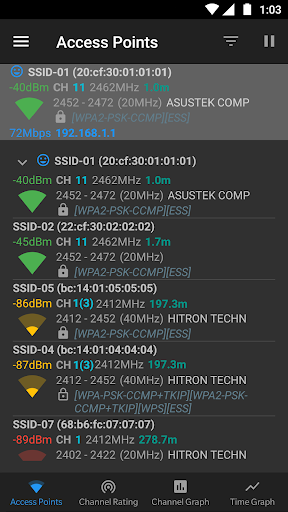
- Identify nearby Access Points
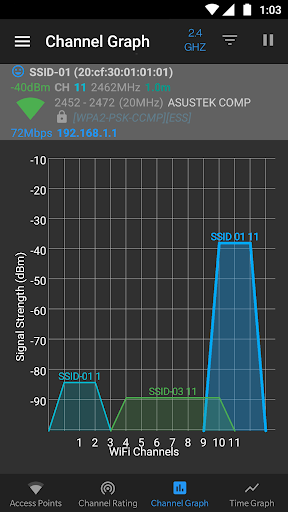
- Graph channels signal strength
- Graph Access Point signal strength over time
- Analyze Wi-Fi networks to rate channels
- HT/VHT Detection - 40/80/160/320 MHz (Requires hardware/software support)
- 2.4 GHz, 5 GHz and 6 GHz Wi-Fi bands (Requires hardware/software support)
- Access Point view: complete or compact
- Estimated Distance to the Access Points
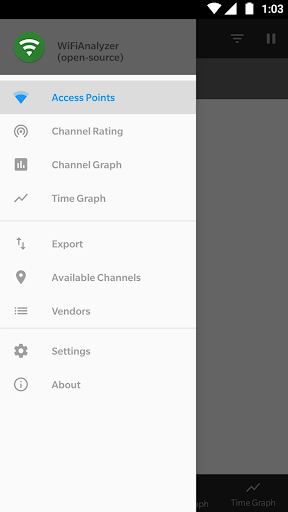
- Export access points details
- Dark, Light and System theme available
- Pause/Resume scanning
- Available filters: Wi-Fi band, Signal strength, Security and SSID
- Vendor/OUI Database Lookup
- The application has too many features to mention them all
Please visit our website for more helpful information:
https://vremsoftwaredevelopment.github.io/WiFiAnalyzer
Notes:
- Android 9 introduced Wi-Fi scan throttling. Android 10 has a new developer option to toggle the throttling off under (Settings > Developer Options > Networking > Wi-Fi scan throttling).
- Android 9.0+ requires location permission and location services to perform a Wi-Fi scan.
Features:
https://vremsoftwaredevelopment.github.io/WiFiAnalyzer/#features
Usage Tips:
https://vremsoftwaredevelopment.github.io/WiFiAnalyzer/#usage-tips
How-to:
https://vremsoftwaredevelopment.github.io/WiFiAnalyzer/#how-to
FAQ:
https://vremsoftwaredevelopment.github.io/WiFiAnalyzer/#faq
GitHub is the place to go for bug reports and code contributions:
https://vremsoftwaredevelopment.github.io/WiFiAnalyzer/#feedback
Editor's Take
WiFi Analyzer (open-source) sits at 4.1 stars across 28.2 thousand ratings on Google Play, and is still building an audience.
A rating in this range tells us the core loop works for most players; the usual friction points are cosmetic or balance-tweak territory rather than anything fundamentally broken.
VREM Software Development is the publisher behind this release; we'd suggest taking a quick look at their other titles on Google Play if the style clicks with you. The last visible update lands 2026-01-10, which is a small but useful signal that the team is still shipping fixes rather than treating the app as abandoned.
Who This App Is For
A quick read on the audiences this app tends to click with, based on its category, content rating and track record on Google Play.
- Family-friendly playersContent is rated Everyone, so it's a safe pick for shared devices.
- Power usersBuilt for people who want a focused utility, not a feed.
- Free-tier explorersFree on Google Play, so you can trial the loop before deciding if it earns space on your home screen.
At a Glance
thumb_up What stands out
- Well-received by its audienceSitting above 4 stars on Google Play means most players finish their first session satisfied.
- Free to try on Google PlayNo upfront cost, so you can confirm the loop clicks before committing time or in-app purchases.
- Actively maintainedLast visible update 2026-01-10, suggesting the team is still shipping fixes.
- Known publisherPublished by VREM Software Development — worth checking their catalogue for similar titles.
info Things to know
- Smaller user baseNiche community means fewer community guides — great for discovery, slower for help with edge cases.
- In-app purchases may applyFree-to-play economics are common in this category — open the Google Play listing to confirm the monetization model before committing.
- Check device compatibilityOlder devices or restricted regions sometimes filter out specific Google Play listings. Confirm on the official page before setting aside time.
Key Features
- - Identify nearby Access Points
- - Graph channels signal strength
- - Graph Access Point signal strength over time
- - Analyze Wi-Fi networks to rate channels
- - HT/VHT Detection - 40/80/160/320 MHz (Requires hardware/software support)
- - 2.4 GHz, 5 GHz and 6 GHz Wi-Fi bands (Requires hardware/software support)
- - Access Point view: complete or compact
- - Estimated Distance to the Access Points