About this app
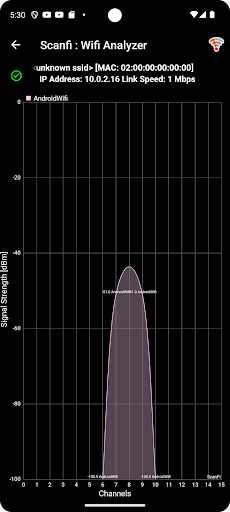
ScanFi is a powerful wireless network analyzer and Wi-Fi mapping tool that turns your Android phone into a passive scanning device. Scan your network without connecting to any access points and get detailed insights with interactive graphs. Now, map your Wi-Fi network with real-time signal data and OpenStreetMap
This app meets user needs as a simple Wi-Fi scanner and analyzer, with no extra hardware required. It requests standard permissions in line with Google/Android policies.
Key Features:
- Scan for available access points and view their signal strength, SSID, MAC address, and more.
- Analyze specific access points with a 60-second historical graph.
- View activity on your Wi-Fi network with interactive graphs.
- See channel ratings to identify the least crowded channel.
- Display channel spread for both 2.4GHz and 5GHz bands.
- Support for scanning both 2.4GHz and 5GHz bands.
- Create a Wi-Fi signal strength map of your area using OpenStreetMap integration for visualizing coverage.
- Measure average download speed.
- Identify open access points nearby.
- Search for hidden/unknown access points.
Notes:
- This app is for analysis and mapping only, not for Wi-Fi connections.
- 2.4GHz or 5GHz scanning requires compatible Android device hardware.
This app is not commercial use
Contact email: [email protected]
Editor's Take
ScanFi: WiFi Analyzer & Mapper sits at 4.2 stars across 157 ratings on Google Play, and is still building an audience.
A rating in this range tells us the core loop works for most players; the usual friction points are cosmetic or balance-tweak territory rather than anything fundamentally broken.
Vikrant Waghmode is the publisher behind this release; we'd suggest taking a quick look at their other titles on Google Play if the style clicks with you. The last visible update lands 2024-12-16, which is a small but useful signal that the team is still shipping fixes rather than treating the app as abandoned.
Who This App Is For
A quick read on the audiences this app tends to click with, based on its category, content rating and track record on Google Play.
- Family-friendly playersContent is rated Everyone, so it's a safe pick for shared devices.
- Power usersBuilt for people who want a focused utility, not a feed.
- Free-tier explorersFree on Google Play, so you can trial the loop before deciding if it earns space on your home screen.
At a Glance
thumb_up What stands out
- Well-received by its audienceSitting above 4 stars on Google Play means most players finish their first session satisfied.
- Free to try on Google PlayNo upfront cost, so you can confirm the loop clicks before committing time or in-app purchases.
- Actively maintainedLast visible update 2024-12-16, suggesting the team is still shipping fixes.
- Known publisherPublished by Vikrant Waghmode — worth checking their catalogue for similar titles.
info Things to know
- Smaller user baseNiche community means fewer community guides — great for discovery, slower for help with edge cases.
- In-app purchases may applyFree-to-play economics are common in this category — open the Google Play listing to confirm the monetization model before committing.
- Check device compatibilityOlder devices or restricted regions sometimes filter out specific Google Play listings. Confirm on the official page before setting aside time.
Key Features
- - Scan for available access points and view their signal strength, SSID, MAC address, and more.
- - Analyze specific access points with a 60-second historical graph.
- - View activity on your Wi-Fi network with interactive graphs.
- - See channel ratings to identify the least crowded channel.
- - Display channel spread for both 2.4GHz and 5GHz bands.
- - Support for scanning both 2.4GHz and 5GHz bands.
- - Create a Wi-Fi signal strength map of your area using OpenStreetMap integration for visualizing coverage.
- - Measure average download speed.