Source check
Ratings, screenshots, version and install tier are treated as public store signals, not as a LogicAppGuide endorsement.
Curated brain-training & logic apps for Android



Sliding Puzzle is covered in the LogicAppGuide Android app library as a Puzzle app. Use this page to compare fit, screenshots and public signals, while the official Google Play listing remains the source for installation decisions.
For the Puzzle category, LogicAppGuide looks for a clear use case: what problem the app solves, how quickly a reader can judge fit, and whether its screenshots and public signals make sense beside nearby picks.
Its 4.5 star average is a strong public signal, but the most useful check is whether recent reviewers still mention stable performance, fair pacing and acceptable ad load.
The visible update date is 2025-09-19. Treat that as a maintenance clue, then confirm on Google Play because version notes, compatibility and permissions can change after this page is generated.
Before opening the official listing for Sliding Puzzle, compare the screenshots with your actual use case and check whether the developer, pricing model and permission requests match what you expect from this type of app.
Ratings, screenshots, version and install tier are treated as public store signals, not as a LogicAppGuide endorsement.
Use the official listing to confirm permissions, current pricing, compatibility and the newest user reviews.
Review basis: Google Play listing metadata, store description claims, public rating/install/review signals, category tags, monetization flags, and LogicAppGuide puzzle-category comparison.
Sliding Puzzle by NemaSense is a picture-based version of the classic sliding tile puzzle. Instead of arranging numbered tiles into order, the player rebuilds an image by moving pieces through the empty space. That changes the feel of the challenge. Numbered 15-puzzles are about sequence, parity, and positional planning; image sliding puzzles add visual memory and pattern recognition. You are not just asking, "Where does tile 12 belong?" You are noticing a skyline, an animal's eye, a plate of food, a line of paint, or the edge of a summer photo and trying to restore the picture with the fewest moves.
The local Google Play metadata shows 100,000+ installs, 104,831 real installs, 566 ratings, 39 written reviews, and a 4.48 average. That is a healthy rating for a smaller puzzle app. It does not have the scale of the biggest tile or block games, but the numbers suggest a stable audience for a simple classic format. The app was released on December 1, 2019, and the source snapshot lists an update date of September 20, 2025, with version 3.5.2, so it has been maintained well beyond launch.
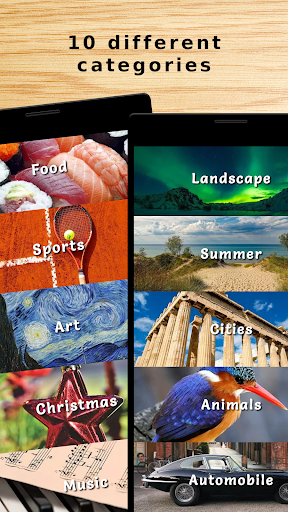
The main feature set is practical and specific. The listing mentions 10 image categories: landscapes, animals, cities, Christmas, automobiles, food, sports, art, music, and summer. That variety matters because a sliding image puzzle can become dull if every puzzle is the same kind of photograph. Landscapes and city scenes usually provide strong edges and color regions. Food and animals give recognizable details. Art and music categories can be more abstract, depending on the images. The premium categories listed in the description, including animals, landscapes, and cities, add 50 images each, which explains part of the in-app purchase model.
Difficulty is handled through three levels. That is simple, perhaps too simple for expert puzzle players, but probably enough for a broad audience. Picture sliding puzzles do not need a dozen difficulty labels if the board sizes are well chosen and the images are readable. The important thing is whether difficulty changes the number of tiles, the complexity of the image, or both. A large board with a clean landscape can sometimes be easier than a smaller board with repetitive texture. Good puzzle selection should account for that.
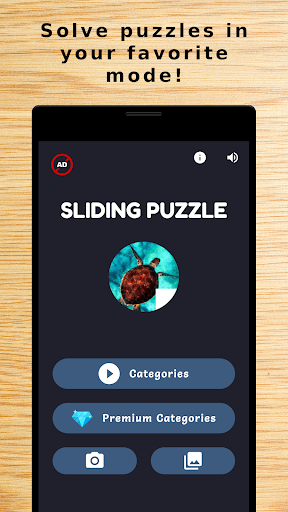
The most distinctive part of NemaSense's app is the three game modes: Classic, Take a Picture, and Gallery. Classic mode covers the built-in image sets. Gallery mode lets players use their own images from the device. Take a Picture mode turns the camera into an immediate puzzle source. That is a smart fit for the format. A personal photo makes the puzzle more engaging because the player already understands the image, but it can also make the challenge more uneven. A photo with a clear subject and contrasting colors will work well; a blurry wall, a dark room, or a repeated texture will become frustrating. The ability to make your own puzzles gives this app more replay value than a fixed pack of stock images.
Touch feel is the make-or-break detail. Sliding puzzles ask players to make many small moves in a row, often while planning several steps ahead. If the empty space is not obvious, if tiles do not slide instantly, or if the app misreads swipes, the entire experience suffers. The listing's promise is not about complex mechanics, so the app must feel clean. Users should test the first few puzzles with sound and haptics settings adjusted to taste, then decide whether repeated movement feels natural.
The monetization looks moderate. The metadata shows ads and in-app purchases from $0.99 to $3.99 per item. That range is low compared with many casual puzzle apps, and it makes sense if purchases are mostly image packs or premium categories. Still, ads can be more disruptive in a concentration puzzle than in a fast arcade game. A sliding puzzle has a quiet, deliberate rhythm; interstitials between short levels can break that rhythm. The best experience would keep ads away from active solving and reserve purchases for optional content.
The Everyone content rating is appropriate, and the app's categories include sliding, casual, single player, realistic, and offline. The offline tag is useful because image sliding puzzles should not depend on a connection unless you are downloading new packs or serving ads. For families, this app has a simple advantage over pure number puzzles: children may find image reconstruction easier to understand than numeric order. Adults who grew up with physical sliding picture toys may also appreciate the nostalgia.
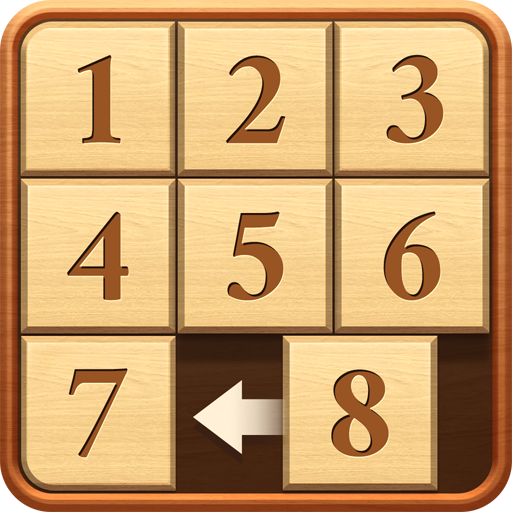
Compared with Number Puzzle - Sliding Puzzle, this app is more visual and personal. Number Puzzle supports many board sizes and has a stronger abstract logic identity. NemaSense's Sliding Puzzle is more about pictures, categories, and making puzzles from your own images. Compared with jigsaw apps, it is more constrained and tactical: pieces cannot be lifted freely, and the empty slot creates a small maze of dependencies. Compared with tangram games, it is less about shape fitting and more about restoring a known composition.
The rating profile suggests users generally like it, though the sample of written reviews is small. A 4.48 average from 566 ratings is promising, but readers should still check recent comments for ads, camera permissions, image import issues, or crashes on newer Android versions. Photo and gallery features can be sensitive to Android permission changes, so update recency is especially relevant.
My verdict is that Sliding Puzzle by NemaSense is a worthwhile option if you want a classic image-sliding puzzle rather than another number-grid app. Its category variety, personal photo modes, offline-friendly identity, and low IAP range give it a clear reason to exist. It will not satisfy players looking for elaborate campaigns or advanced competitive systems, but it does not need to. If the controls are responsive and ads stay outside the puzzle flow, this is a clean, approachable sliding puzzle app for quick visual logic sessions.