About this app
SD Maid 2/SE is your Android’s trusted assistant, to keep it clean and tidy.
Nobody is perfect and neither is Android.
* Apps you have already removed leave something behind.
* Logs, crash reports and other files you don't want are constantly being created.
* Your storage is collecting files and folders you don't recognize.
* Duplicate photos in your gallery.
Let’s not go on here… Let SD Maid 2/SE help you!
SD Maid 2/SE is an app and file manager that specializes in knowing which apps have created specific files on your device. SD Maid 2/SE searches your device and compares files with installed apps to offer options for safely freeing up storage space.
✨ Clean up after uninstalling apps
If apps create files outside their designated folders then files can remain even after uninstalling the apps. The "CorpseFinder" tool finds app remnants, tells you to which app they belonged and helps you delete them.
🔍 Search your device the smart way
Filter for empty folders, temporary files, already installed apps and more. You can even create your own search criteria. The "SystemCleaner" tool allows you to automatically search your device and delete files based on various criteria.
🧹 Delete expendable files and hidden caches
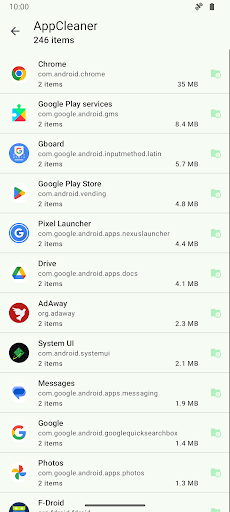
Thumbnails, trash bins, offline caches and more: If apps don't clean up after themselves, then this app will. The "AppCleaner" tool finds apps with expendable files.
📦 Manage all of your apps
Get a comprehensive list of all apps installed on your device. Enabled, disabled, user or system app: no app can hide from you. The "AppControl" tool is an app manager that allows you to search, sort and control your apps.
📊 What is using all your space
Storage management can be complex with apps, media, system, and other files across phone storage, SD cards, and USB devices. "StorageAnalyzer" is a file manager that displays how space is used on your device, simplifying your storage management.
📷 Find duplicate data
Duplicate downloads, photos sent through social media or just similar pictures of the same scene: Over time copies can accumulate. The "Deduplicator" tool finds files that are exactly the same or similar and helps you delete extra copies.
This app is ad-free. Some features require a paid upgrade.
SD Maid 2/SE is the successor to SD Maid 1/Legacy.
Optimized for newer Android versions and focused on cleaning up.
This app has optional features that utilize the AccessibilityService API to automate tedious actions.
Using the AccessibilityService API, this app can click buttons for you to perform operations on multiple apps, e.g. deleting caches.
This app does not use the AccessibilityService API to collect information.
SD Maid 2/SE is a File Manager & Cleaner App.
Editor's Take
SD Maid 2/SE - System Cleaner sits at 4.3 stars across 7.7 thousand ratings on Google Play, and is still building an audience.
A rating in this range tells us the core loop works for most players; the usual friction points are cosmetic or balance-tweak territory rather than anything fundamentally broken.
darken is the publisher behind this release; we'd suggest taking a quick look at their other titles on Google Play if the style clicks with you. The last visible update lands 2025-12-19, which is a small but useful signal that the team is still shipping fixes rather than treating the app as abandoned.
Who This App Is For
A quick read on the audiences this app tends to click with, based on its category, content rating and track record on Google Play.
- Family-friendly playersContent is rated Everyone, so it's a safe pick for shared devices.
- Power usersBuilt for people who want a focused utility, not a feed.
- Free-tier explorersFree on Google Play, so you can trial the loop before deciding if it earns space on your home screen.
At a Glance
thumb_up What stands out
- Well-received by its audienceSitting above 4 stars on Google Play means most players finish their first session satisfied.
- Free to try on Google PlayNo upfront cost, so you can confirm the loop clicks before committing time or in-app purchases.
- Actively maintainedLast visible update 2025-12-19, suggesting the team is still shipping fixes.
- Known publisherPublished by darken — worth checking their catalogue for similar titles.
info Things to know
- Smaller user baseNiche community means fewer community guides — great for discovery, slower for help with edge cases.
- In-app purchases may applyFree-to-play economics are common in this category — open the Google Play listing to confirm the monetization model before committing.
- Check device compatibilityOlder devices or restricted regions sometimes filter out specific Google Play listings. Confirm on the official page before setting aside time.
Key Features
- 🔍 Search your device the smart way
- 🧹 Delete expendable files and hidden caches
- 📦 Manage all of your apps
- 📊 What is using all your space
- 📷 Find duplicate data