Source check
Ratings, screenshots, version and install tier are treated as public store signals, not as a LogicAppGuide endorsement.
Curated brain-training & logic apps for Android



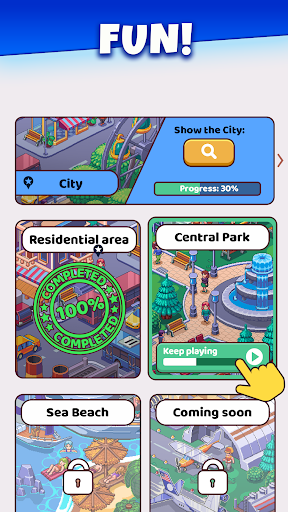
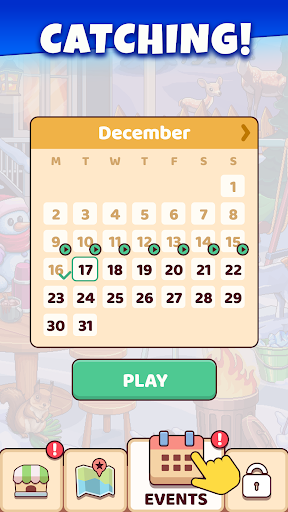

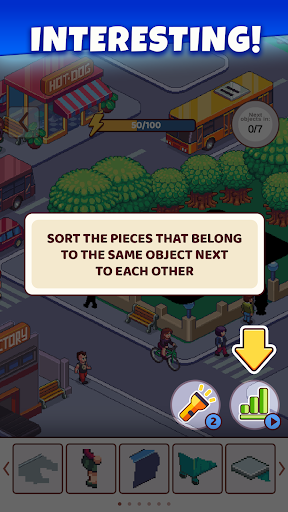



Picture Builder - Puzzle Game is covered in the LogicAppGuide Android app library as a Puzzle app. Use this page to compare fit, screenshots and public signals, while the official Google Play listing remains the source for installation decisions.
For the Puzzle category, LogicAppGuide looks for a clear use case: what problem the app solves, how quickly a reader can judge fit, and whether its screenshots and public signals make sense beside nearby picks.
Its 4.3 star average suggests the basic experience works for many users, but mixed recent reviews can reveal problems hidden by an all-time score.
The visible update date is 2026-01-15. Treat that as a maintenance clue, then confirm on Google Play because version notes, compatibility and permissions can change after this page is generated.
Before opening the official listing for Picture Builder - Puzzle Game, compare the screenshots with your actual use case and check whether the developer, pricing model and permission requests match what you expect from this type of app.
Ratings, screenshots, version and install tier are treated as public store signals, not as a LogicAppGuide endorsement.
Use the official listing to confirm permissions, current pricing, compatibility and the newest user reviews.
Review basis: Google Play listing metadata, screenshots, public rating signals, store feature claims, and LogicAppGuide category comparison.
Picture Builder - Puzzle Game from Hitapps Games is not a conventional jigsaw puzzle where a photo is cut into interlocking pieces. It is closer to a relaxed pixel-art scene builder. The player starts with cityscapes that feel empty or unfinished, then assembles objects, people, animals, plants, transport, buildings, landmarks, and street details into the correct places. Each object functions like a puzzle piece, and the completed reward is a lively illustrated location rather than a simple cleared board.
That premise gives Picture Builder a different feel from most puzzle Android apps. A block puzzle asks the player to manage space. A match-3 asks the player to make efficient swaps. Picture Builder asks the player to inspect an illustration, identify the missing fragment, enlarge objects when necessary, and place pieces until the city becomes populated. The listing also appeals to fans of hidden objects, color by number, pixel art, art puzzles, jigsaw puzzles, and logic games. That broad pitch is reasonable because the app sits between several genres.
The public metrics are strong. The metadata shows 5,000,000+ installs, 5,111,135 real installs, a 4.338182 rating, 60,225 ratings, and 1,491 written reviews. That is a meaningful review base. The rating is good rather than spectacular, but the audience size makes it more credible than a tiny five-star average. Picture Builder was released on July 9, 2023 and updated to version 2.5.3 on January 15, 2026, so it appears to be an actively maintained modern puzzle app.
The best part of the concept is its sense of accumulation. Each location unfolds in parts, and every correctly placed object adds life to the scene. A bus, a plant, a building detail, a character, or an animal is not just a shape that disappears after being matched. It remains in the world and contributes to the final picture. That makes progress visible in a softer, more satisfying way than a score counter. Players who enjoy decorating games, city builders, or object-finding books may find that especially appealing.
The puzzle challenge likely comes from observation rather than difficult rules. The player needs to determine where a fragment belongs, sometimes using zoom or hints. In a good art puzzle, the difficulty is balanced by visual clues: color, shape, scale, perspective, and surrounding context. If the object is a piece of transportation, the road layout may suggest its position. If it is a plant, an empty planter or patch of ground may give it away. The pleasure is in noticing the clue and watching the picture resolve.
Visually, Picture Builder has a strong identity. The categories include Stylized, Pixelated, Jigsaw, Casual, Single player, and Offline, and the metadata includes 24 screenshots. Pixel art is a smart fit for mobile puzzles because it can be colorful, readable, and charming at small sizes. It also lets the game present busy city scenes without needing photorealistic detail. The risk is clutter. If a location contains too many tiny objects, players may rely heavily on hints rather than genuine observation. A good zoom function is therefore not a luxury; it is central to usability.
Picture Builder is best for players who want a calm visual puzzle with a creative payoff. It should suit adults looking for anxiety-relief games, casual players who prefer art over abstract grids, and hidden-object fans who enjoy scanning scenes. It is also accessible in rule terms because there is no complex system to learn. However, it may not satisfy players who want hard logic, competitive scoring, or mechanical depth. The app's challenge is likely gentle and visual, not mathematically demanding.
Compared with classic jigsaw apps, Picture Builder offers more scene-building personality. You are not reconstructing a rectangular photo from hundreds of edge pieces. You are adding meaningful objects to a location. Compared with hidden-object games, it is more constructive than investigative: instead of only finding objects in a finished scene, you help create the finished scene. Compared with color-by-number apps, it has more placement logic because objects must go into the right context rather than simply filling numbered cells.
The download and purchase considerations are important. Picture Builder is free-to-play, ad supported, and contains ads. It also offers in-app purchases from $0.99 to $119.99 per item, which is the largest IAP range among these six Android apps. That does not mean a player will need to spend at the high end, but it does make caution reasonable. Check whether purchases relate to hint packs, ad removal, special locations, bundles, or event content. Parents should be especially careful because the content rating is Everyone, but the purchase ceiling is high.
Offline categorization is a useful advantage. A visual puzzle like this is well suited to offline play because it does not require real-time multiplayer or constant leaderboard updates. That makes it a good travel or waiting-room game if the core levels are available without a connection. Some monetized features, rewards, or ads may still depend on internet access, so the offline label should be understood as a core-play benefit rather than a promise that every feature works disconnected.
The main caveats are monetization, possible hint reliance, and broad marketing language. The description calls the game revolutionary and promises countless locations, but players should judge the actual variety by screenshots and early levels. The score is positive, but not so high that friction can be ignored. With more than 60,000 ratings, a 4.34 average suggests many players enjoy it while some likely object to ads, difficulty pacing, or purchase design.
Overall, Picture Builder - Puzzle Game is a distinctive and credible art-puzzle Android app. Its strengths are the pixelated city-building premise, large install base, substantial rating count, recent update, many screenshots, offline-friendly categorization, and relaxed object-placement gameplay. Its weaknesses are ad support, a very high top-end IAP range, and the possibility that later scenes lean too much on hints. It is easy to recommend to players who like hidden-object scenes, pixel art, and gentle jigsaw-adjacent puzzles. It is less compelling for players who want pure logic or a purchase-light casual app.