About this app
Flashlight Master turns your phone into a powerful LED flashlight and advanced light multi-tool - fast, bright, and designed for everyday use, emergencies, and creative work.
Whether you need an instant torch light, a calming night light, an emergency SOS strobe, or a full-screen green screen for video creation, Flashlight Master delivers everything in one clean and reliable app.
🔦 Core Flashlight Features
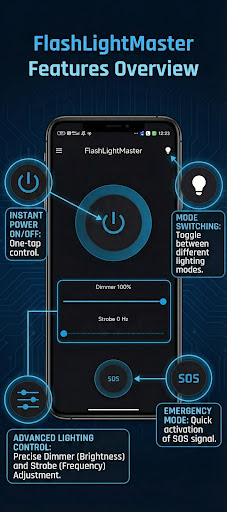
Ultra-bright LED torch using your device’s camera flash
Screen light mode for soft or ambient lighting
Brightness control with smooth intensity slider
Strobe light with adjustable frequency
SOS & Panic mode for emergency signaling
🌙 Night, Focus & Relaxation
Night light with candle & campfire effects
Meditation & breathing light modes (Box, Pranayama, Balanced, Custom)
Perfect for sleep, reading, focus, and stress reduction
🎥 Creative & Pro Tools
Green screen & blue screen modes for chroma key video
Tracking markers for motion tracking, stabilization & VFX workflows
Custom color screen for photography, testing & ambient light
🧭 Utility Tools
Bubble level for horizontal & vertical alignment
Timer with automatic on/off control
Morse code flashlight to send custom messages with LED blinking
Shake to toggle flashlight on or off instantly
⚙️ Smart Controls
Turn flashlight on at app launch
Works smoothly on all modern Android devices
Lightweight, fast, and battery-aware
⭐ Why Choose Flashlight Master?
One of the brightest LED flashlight apps on Android
Combines torch, strobe, SOS, night light, green screen & utility tools
Ideal for emergencies, camping, home use, relaxation, and content creation
Clean design. No clutter. Just useful features.
Turn your smartphone into a versatile flashlight, emergency light, and creative lighting toolkit with Flashlight Master.
Editor's Take
Flashlight Master - LED Torch is a newer listing with a limited review footprint so far, and is still building an audience.
Review volume is mixed enough that we'd recommend skimming a few recent Google Play reviews before you invest, especially on devices older than a couple of years.
M.O.H.A is the publisher behind this release; we'd suggest taking a quick look at their other titles on Google Play if the style clicks with you.
Who This App Is For
A quick read on the audiences this app tends to click with, based on its category, content rating and track record on Google Play.
- Family-friendly playersContent is rated Everyone, so it's a safe pick for shared devices.
- Power usersBuilt for people who want a focused utility, not a feed.
- Free-tier explorersFree on Google Play, so you can trial the loop before deciding if it earns space on your home screen.
At a Glance
thumb_up What stands out
- Free to try on Google PlayNo upfront cost, so you can confirm the loop clicks before committing time or in-app purchases.
- Known publisherPublished by M.O.H.A — worth checking their catalogue for similar titles.
info Things to know
- Smaller user baseNiche community means fewer community guides — great for discovery, slower for help with edge cases.
- In-app purchases may applyFree-to-play economics are common in this category — open the Google Play listing to confirm the monetization model before committing.
- Check device compatibilityOlder devices or restricted regions sometimes filter out specific Google Play listings. Confirm on the official page before setting aside time.
- Update cadence unclearNo recent update date surfaced here; look at the Google Play listing to confirm active maintenance.
Key Features
- 🔦 Core Flashlight Features
- 🌙 Night, Focus & Relaxation
- 🎥 Creative & Pro Tools
- 🧭 Utility Tools