About this app
Fix slow internet, detect unknown devices, and monitor your network with Flair WiFi Analyzer—your ad-free, professional-grade diagnostic tool for Android.
🔧 SOLVE THESE PROBLEMS:
• Slow internet speeds at home or office
• Unknown devices using your network
• Wi-Fi dead zones and weak signal areas
• Gaming lag and streaming interruptions
• Network connectivity troubleshooting
🆓 FREE NETWORK TOOLS:
📶 Wi-Fi Signal Analyzer - View signal strength with color-coded feedback
🚀 Speed Test - Measure download/upload speeds with quality ratings
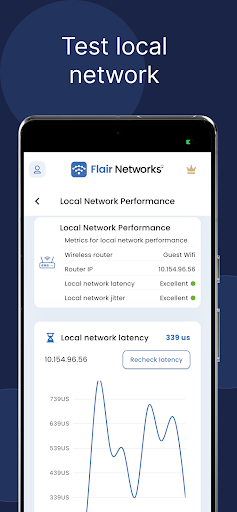
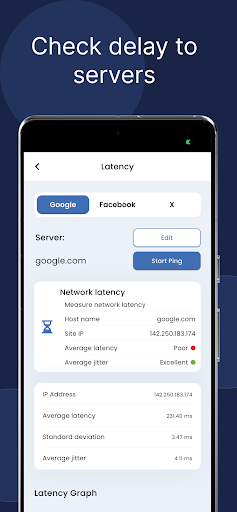
⏳ Latency Test - Check ping delays to your router and major servers
📡 Channel Scanner - Analyze 2.4GHz, 5GHz, and 6GHz Wi-Fi channels
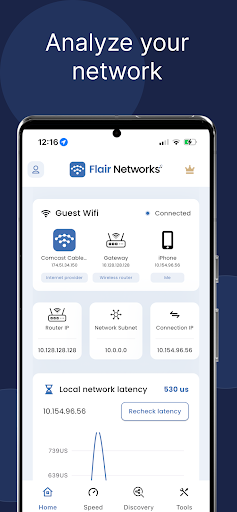
🛰️ ISP Information - View your internet provider and connection details
🌐 Network Configuration - Find local IP, router IP, BSSID, and security info
⚡ FLAIR PRO FEATURES:
🧭 Device Scanner - Discover all devices on your network with IP/MAC details
🛠️ Advanced Network Diagnostics - Professional troubleshooting tools
🌐 Whois Analysis - Deep domain and IP information lookup
📊 Network Insights - Comprehensive network health analysis
🔍 Traceroute Tools - Advanced network path analysis
📈 Historical Data - Get historical information about your network
Perfect For:
◦ Diagnosing Wi-Fi connectivity issues and internet disruptions
◦ Identifying unknown or unauthorized devices on your network
◦ Monitoring performance across home or office networks
◦ Troubleshooting latency, gaming lag, and streaming interruptions
💡 WHO BENEFITS:
• Homeowners fixing Wi-Fi problems
• Small business network managers
• IT students learning networking
• Gamers optimizing connection performance
• Anyone wanting reliable internet
✨ WHY CHOOSE FLAIR:
✓ Completely ad-free experience
✓ Professional-grade tools made simple
✓ No technical expertise required
✓ Trusted by thousands of users worldwide
Transform your Wi-Fi experience today. Download Flair WiFi Analyzer and take control of your network performance.
You can find the terms of services at
https://www.flairnetworks.com/terms
The privacy policy is at
https://www.flairnetworks.com/privacy
Thank you for choosing our app.
Developed by Flair Networks - Your network analysis experts.
Editor's Take
Flair WiFi Analyzer is a newer listing with a limited review footprint so far, and is still building an audience.
Review volume is mixed enough that we'd recommend skimming a few recent Google Play reviews before you invest, especially on devices older than a couple of years.
Flair Networks Incorporated is the publisher behind this release; we'd suggest taking a quick look at their other titles on Google Play if the style clicks with you.
Who This App Is For
A quick read on the audiences this app tends to click with, based on its category, content rating and track record on Google Play.
- Family-friendly playersContent is rated Everyone, so it's a safe pick for shared devices.
- Power usersBuilt for people who want a focused utility, not a feed.
- Free-tier explorersFree on Google Play, so you can trial the loop before deciding if it earns space on your home screen.
At a Glance
thumb_up What stands out
- Free to try on Google PlayNo upfront cost, so you can confirm the loop clicks before committing time or in-app purchases.
- Known publisherPublished by Flair Networks Incorporated — worth checking their catalogue for similar titles.
info Things to know
- Smaller user baseNiche community means fewer community guides — great for discovery, slower for help with edge cases.
- In-app purchases may applyFree-to-play economics are common in this category — open the Google Play listing to confirm the monetization model before committing.
- Check device compatibilityOlder devices or restricted regions sometimes filter out specific Google Play listings. Confirm on the official page before setting aside time.
- Update cadence unclearNo recent update date surfaced here; look at the Google Play listing to confirm active maintenance.
Key Features
- 🔧 SOLVE THESE PROBLEMS:
- • Slow internet speeds at home or office
- • Unknown devices using your network
- • Wi-Fi dead zones and weak signal areas
- • Gaming lag and streaming interruptions
- • Network connectivity troubleshooting
- 🆓 FREE NETWORK TOOLS:
- 📶 Wi-Fi Signal Analyzer - View signal strength with color-coded feedback