About this app
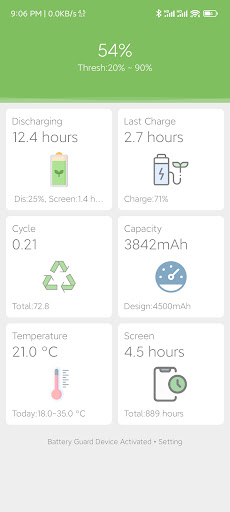
Experiments on lithium batteries have proven that shallow charging and discharging maximizes the cycle life of the battery, if the loss of charge from 0% to 100% is recorded as 1 cycle, then
* Charge to 90%, only 0.52 cycle
* Charge to 80%, only 0.27 cycle
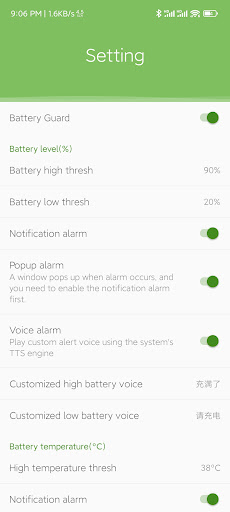
Battery Guard can set high and low thresholds and then alerting the user when the power reaches the threshold, so that the battery maintains a shallow cycle working state.
App features are as follows:
* Light and compact App, less than 200k.
* Support text, vibration and voice alarm when the power reaches the threshold.
* Voice alarm uses TTS engine and supports custom voice.
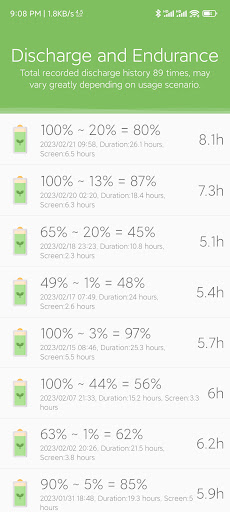
* Backend records daily battery cycle loss and generates daily, weekly and monthly statistical charts.
* Record battery temperature and generate daily, weekly and monthly statistical charts.
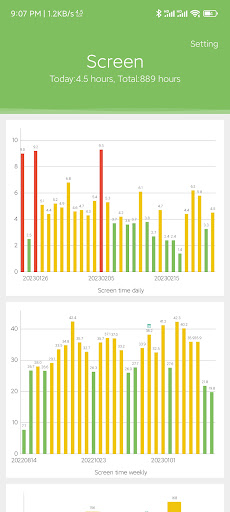
* Record daily bright screen time and generate daily, weekly, and monthly statistical charts.
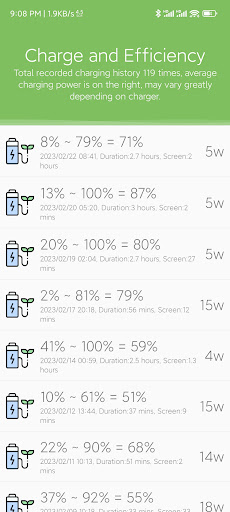
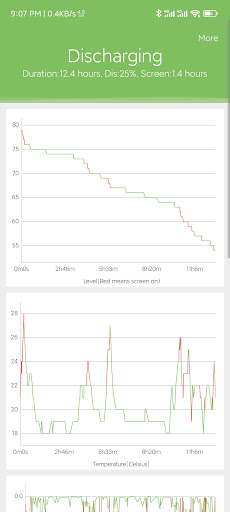
* Support charging and discharging details, including charts of power, temperature, current, etc.
In addition to the basic battery-related statistics, the following functions are supported.
* Support daily, weekly, and monthly screen time statistics.
* Support daily, weekly, and monthly temperature range statistics.
* Customizable notification bar icons and functions
Battery monitoring requires background operation, please refer to the help to reserve the background correctly.
Editor's Take
Battery Guard sits at 4.1 stars across 516 ratings on Google Play, and is still building an audience.
A rating in this range tells us the core loop works for most players; the usual friction points are cosmetic or balance-tweak territory rather than anything fundamentally broken.
x1y9 is the publisher behind this release; we'd suggest taking a quick look at their other titles on Google Play if the style clicks with you. The last visible update lands 2024-01-08, which is a small but useful signal that the team is still shipping fixes rather than treating the app as abandoned.
Who This App Is For
A quick read on the audiences this app tends to click with, based on its category, content rating and track record on Google Play.
- Family-friendly playersContent is rated Everyone, so it's a safe pick for shared devices.
- Power usersBuilt for people who want a focused utility, not a feed.
- Free-tier explorersFree on Google Play, so you can trial the loop before deciding if it earns space on your home screen.
At a Glance
thumb_up What stands out
- Well-received by its audienceSitting above 4 stars on Google Play means most players finish their first session satisfied.
- Free to try on Google PlayNo upfront cost, so you can confirm the loop clicks before committing time or in-app purchases.
- Actively maintainedLast visible update 2024-01-08, suggesting the team is still shipping fixes.
- Known publisherPublished by x1y9 — worth checking their catalogue for similar titles.
info Things to know
- Smaller user baseNiche community means fewer community guides — great for discovery, slower for help with edge cases.
- In-app purchases may applyFree-to-play economics are common in this category — open the Google Play listing to confirm the monetization model before committing.
- Check device compatibilityOlder devices or restricted regions sometimes filter out specific Google Play listings. Confirm on the official page before setting aside time.